
Excel export removes comma from German decimal number
Excel export removes comma from German decimal number
 K3nguruh
Posts: 15Questions: 1Answers: 0
K3nguruh
Posts: 15Questions: 1Answers: 0
Hi everyone,
I'm not quite sure how to best describe this issue, but I'll give it a try!
I wrote a custom renderer function for formatting German numbers because DataTable.render.number() doesn't yield the result I need.
For example: DataTable.render.number(null, null, 2) displays 100,00 correctly in the table itself, but when exported (PDF, Excel), it outputs 100—truncating the decimal places completely. However, I need the exported output to match what's visible in the table.
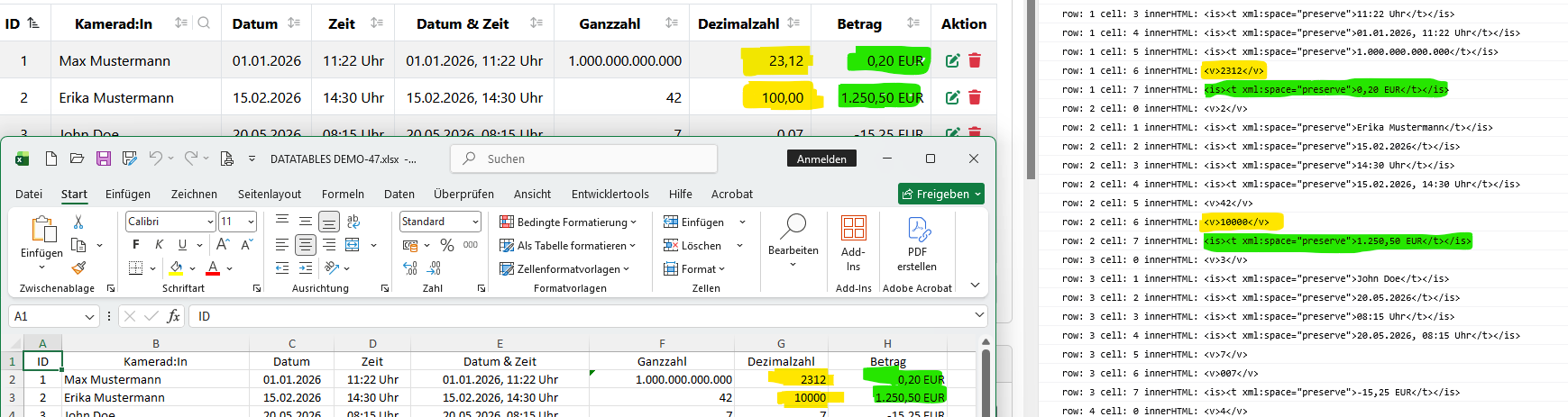
My custom renderer works fine for PDF exports. But for some reason, during the Excel export, the comma separator gets removed, resulting in 10000 instead of 100,00.
I logged the exported cell data to the console to inspect the values. Interestingly, instead of returning a string, the cell value arrives as a numeric type. Meanwhile, in the "Betrag" (Amount) column, everything works as expected.
I even tried appending a space to the formatted string to force string evaluation, but that didn't resolve the issue either.
Replies
Can you show me how you are loading data into the DataTable (e.g. if by Ajax, an example of that data), or if by HTML, then a sample of that. And also the DataTable configuration please? A comma decimal place should work.
Because it is being exported as a number, not a string. But moreover, it isn't applying a formatter in the XSLX file, to have it styled as a comma decimal. How to do that is something that I'd need to research - I can't remember off the top of my head!
Allan
Hi Allan,
I've stripped out several settings from
languageandbuttons, as well as a few other non-essential configurations, to keep the test case focused on the issue.Example:
https://live.datatables.net/jinozeva/1/edit?js,console,output
Hi Allan,
Quick update: It looks like the live example wasn't saved properly earlier. Here is the updated link:
Example:
https://live.datatables.net/jinozeva/4/edit?js,console,output
The truth is that it is a lot more complicated than you think. The trick is to transform the export values to US numeric formats in the export options. According to your regional Excel settings this will be transformed to German or other regional formats by Excel automatically. If you use csv-export as well it has to be opposite: you need to format the exported data according to the target regional Excel installation. E.g. the separator in German won't be a comma, but ";" etc.
You are using fairly inconsistent input data:
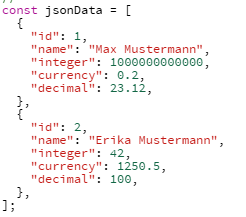
In the first record you have consistent American numbers. In the second record you don't. 100, doesn't make a lot of sense.

This is what my German Excel installation makes of it:
Ok, I need to look at this:
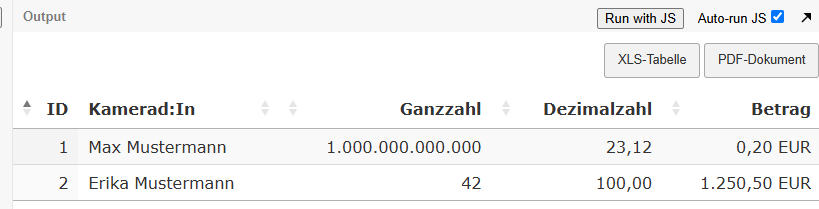
The German thousand separators are ignored by Excel because they don't make any sense in American numbers: Just too many decimals! Hence Excel keeps "Ganzzahl" as it is. Probably it recognizes it as a string, not a number.
23,12 doesn't make a lot of sense either in the US: Hence Excel ignores the comma - and the German Excel installation adds the thousand separator!
Same applies to row 2: 42 is easy; 100,00 makes no sense in the US: A thousand separator after 100 is meaningless. It is being ignored.
The "Betrag" columns with the substring "EUR" in it are interpreted as strings anyway. Hence they are exported as is.
To be sure: This all about how Excel works, not about Data Tables! Data Tables just exports the values as is. You will need to modify them according to your regional requirements.
Here is an old post. I tried to help Massimo from Italy who had a similar issue - like all continental Europeans
https://datatables.net/forums/discussion/comment/164990/#Comment_164990
@allan
You could add something to the Excel export. Just a setting for the interpretation of European number and percentage formats. Could be just one variable to set, the default being: "English" and "Continental" as the second option. To filter out the "numeric" columns I would simply go for all columns that don't contain anything else but numbers, commas and periods. For percentage columns this would still need to be modified a little...
Yup - its complicated!
To start, here is the example (thanks @K3nguruh) updated to use the default DataTable number renderer: https://live.datatables.net/jinozeva/5/edit . The one change I had to make was to reduce the large number, otherwise DataTables shows it in scientific notation. I can look at adding an option to disable that if anyone needs that ability?
Here the numbers shown in the table will be displayed based on the locale in your browser. Here in the UK, I see a comma for a decimal separator. With a German locale, you should see a comma.
The data that is written to the Excel spreadsheet must be the raw data (as the computer understands it). That is, not a formatted value - so in this case a number with no thousands separator, and if there is a decimal character, it is a dot.
What then needs to happen, and this is the piece that is currently missing from my Excel export, is that a number formatter be applied that will apply the thousands separator (ideally, locale based as well). I do have the data it as a number in Excel, so you could right click on the cell and select a suitable number formatter, but I accept that it would be nice to have an option to have a formatter automatically. Ideally, this could be based on the parameters used for the
number()renderer.Does that all make sense?
To be perfectly frank, at the moment, I'm only likely to add this ability if it is a sponsored piece of work, requested under the support packages. At the moment, the raw data being exported to Excel is, I think, acceptable as the Excel export is just a small part of the project, but I do acknowledge that it would be nice to include formatters .
.
Allan
Hi everyone,
First of all, thanks to @rf1234 for pointing me in the right direction—namely, that Excel expects values in international format.
After that, I researched how Excel files work under the hood (structure, formatting rules, etc.).
Ultimately, I managed to get it working! Here is what needed to be done:
That was easier said than done.
First, I had to use the
exportOptions.formatfunction to map German numbers back to standard international formatting. This step has to happen there because, by the time data reaches thecustomizecallback, DataTables has already processed it internally.Additionally, I wanted a few custom styling rules: header/footer cells should always be centered and bold, while body cells should inherit their alignment from the HTML table on the page.
In my test case, the alignment works out as follows:
ID:centerKamerad:In:leftGanzzahl,Dezimalzahl,Betrag:rightThis achieves the exact layout I wanted for both Excel and PDF exports. It works as expected on a German locale system.
Beispiel
https://live.datatables.net/jinozeva/10/edit?js,output
Hi Allan,
Just a quick note.
The number display in the table doesn't work very well with
DataTable.render.number. Decimal places are truncated during export, and "EUR" isn't included either.Example:
https://live.datatables.net/jinozeva/12/edit?js,output
P.S.: Wouldn't it also make sense to integrate
exportinto DataTables alongsidefilter,sort, etc.?The export works on the raw data by default - it doesn't use the rendered value. As noted before, the key for the export is that it should use the actual number, and then apply a formatter in the Excel spreadsheet, so that it acts as a number. That is not currently something that my Excel export does, but it would be something that I'd very much like to add in future if I get the opportunity.
Regarding having an
exporttype, I haven't set it to that by default since Buttons is an optional extra. It is used a lot, but it isn't required, therefore not all renders need to know what an "export" type would be.Allan
@K3nguruh
I like your solution! You got it working really well!
But, it is a lot of code and yes: it is easier said than done
Roland