
dt.columns(':visible').widths().toArray() always returns array of zeros
dt.columns(':visible').widths().toArray() always returns array of zeros
 sebastianbarth
Posts: 72Questions: 15Answers: 0
sebastianbarth
Posts: 72Questions: 15Answers: 0
Hi Allan,
I found a weird situation with the fixedColumns() plugin failing to set correct style.left pixel values (they are all 0).
I couldn't reproduce this in an isolated online example to pass to you.
What I managed to do is to boil it down to a problem with the following snipped in the fixed columns plugin:
    _addStyles() {
        let dt = this.s.dt;
        let that = this;
        let colCount = this.s.dt.columns(':visible').count();
        let headerStruct = dt.table().header.structure(':visible');
        let footerStruct = dt.table().footer.structure(':visible');
        let widths = dt.columns(':visible').widths().toArray();
        ....
     }
There the following call returns an array of 0 values:
let widths = dt.columns(':visible').widths().toArray(); // Returns [0, 0, 0, 0, 0, 0, 0]
This internally calls the following function:
registerPlural('columns().widths()', 'column().width()', function () {
    // Injects a fake row into the table for just a moment so the widths can
    // be read, regardless of colspan in the header and rows being present
    // in the body
    var columns = this.columns(':visible');
    var row = Dom.c('tr').html('<td>' + Array(columns.count()).join('</td><td>') + '</td>');
    Dom.s(this.table().body()).append(row);
    var widths = [];
    var indexes = columns.indexes();
    row.children().each((el, idx) => {
        widths[indexes[idx]] = Dom.s(el).width('outer');
    });
    row.remove();
    return this.iterator('column', (settings, column) => {
        return widths[column] || 0;
    }, true);
});
There the following line produces an <tr></tr> element with now <td> elements, although columns.count() returns 8:
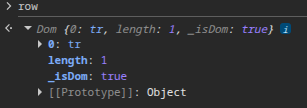

This of course leads to [0, 0, 0, 0, 0, 0, 0].
Any idea what that could be?
I am also a bit confused that we need to filter to :visible in _addStyles() and in the columns().widths() function as well. Is that correct/redundant?
I also noticed that we already have rows. Since you do not allow to have cells with colspan > 1, we could fallback to using existing cells, right? I am looking toward performance optimization via avoiding one forced layout. What do you think?
Thank you for looking into this. I am looking forward to your answer!
Greetings
Sebastian
Answers
The code is using:
Is the element the table is in hidden at that point? That's the only thing off the top of my head...
Allan
Hi Allan,
we traced the problem down to the interaction between
Dom.html()and our default Trusted Types policy, which uses DOMPurify to sanitize HTML strings.In
columns().widths(), DataTables creates a temporary row with:Dom.html()assigns the string to the element’sinnerHTMLproperty. For three columns, this is effectively:That assignment works normally because the browser parses the fragment in the context of a
<tr>. With our Trusted Types configuration, however, the string first passes through our default policy and DOMPurify.DOMPurify parses the string as an HTML document without the destination element’s context. The HTML parser discards these standalone
<td>tags when DOMPurify adds them to a temporarily created<body></body>element , so sanitization returns an empty string. Consequently, the temporary row has no cells to measure.Would you consider creating these structural elements through DOM APIs instead? For example:
This avoids the HTML parsing sink entirely for this operation.
More generally, using
textContentwhere content is intended to be plain text, and DOM creation methods for fixed structural markup, would improve compatibility with Trusted Types enforcement: I noticed quite some usages of.html(v)where.text(v)would suffice. Places that intentionally accept bigger HTML (e.g. performance reasons) would still need appropriate handling, of course.A dedicated Trusted Types policy might also be an option for strictly controlled, library-generated markup, provided the application’s CSP permits it. It should not automatically trust arbitrary strings or application-supplied content, though. Otherwise, this would introduce a risk.
Other applications using a DOMPurify-backed default policy could encounter the same issue. DOMPurify as sanitizer is the quasi the industry standard.
What is your opinion on this?
Thank you for tracking that down. Very happy to make that change - done here.
Overall, it is good practice to use just DOM methods rather than writing into .
.
innerHTML. That needs to be balanced with backwards compatibility and cases where there is already XSS protection (such as using the built in renderers in DataTables). The more I can move to just DOM methods, the better, without breaking thingsAllan
The problem for this particular case is solved. My thanks!
FYI: We hit the same issue with Scroller 2.4.3 (DT 2.3.8), where it assigns the hardcoded HTML:
http://github.com/DataTables/Scroller/blob/84ee39a75bf0b91d152ff5d44760dcf92f569c3c/js/dataTables.scroller.js#L610
Because we can't upgrade Datatables to 3.x.x in this case, we are forced to make an exception. Luckily the HTML there is hardcoded and safe.
I have the fear that we will have to come back to this topic more often in the near future. Do you have concrete upgrade plans for switching to pure DOM methods?
Thank you
Sebastian
Hi Sebastian,
Why can't you update to 3.x? (Apologies if you've already told me and I've forgotten).
All new code use only DOM methods, and I'm updating anything that writes to
innerHTMLinternally as appropriate and as I'm updating code. If there are any specific areas of concern, please let me know.Allan
Hi Allan,
the upgrade to 3.x in this particular case is just not feasible given the risk and involved effort.
In another case we are already actively working on an upgrade to 3.x.x.
Thanks for your statement on this!
Sebastian
Understood - thanks for letting me know. I do work hard on the backwards compatibility, but v3 is a big change, and as we've seen there are some hiccups...
All the best,
Allan
Hi Allan,
do you already know when you will release a new version?
I am asking because the DOMPurify fix did not land in 3.1.2.
Greetings
Sebastian
Currently expecting to tag and release it tomorrow .
.
Allan