
Various Items migrating to V3
Various Items migrating to V3
 PaulVickery
Posts: 51Questions: 8Answers: 0
PaulVickery
Posts: 51Questions: 8Answers: 0
I have been migrating from Datatables V2 to V3 and have come up against a few issues which I would appreciate some help with.
I have created a website at https://dt.taskmgr.co.uk/various_issues.html which demonstrates the various issues.
1) StateRestore
I have implemented the new StateRestore functionality successfully https://datatables.net/manual/server/php/states but have the following minor issues.
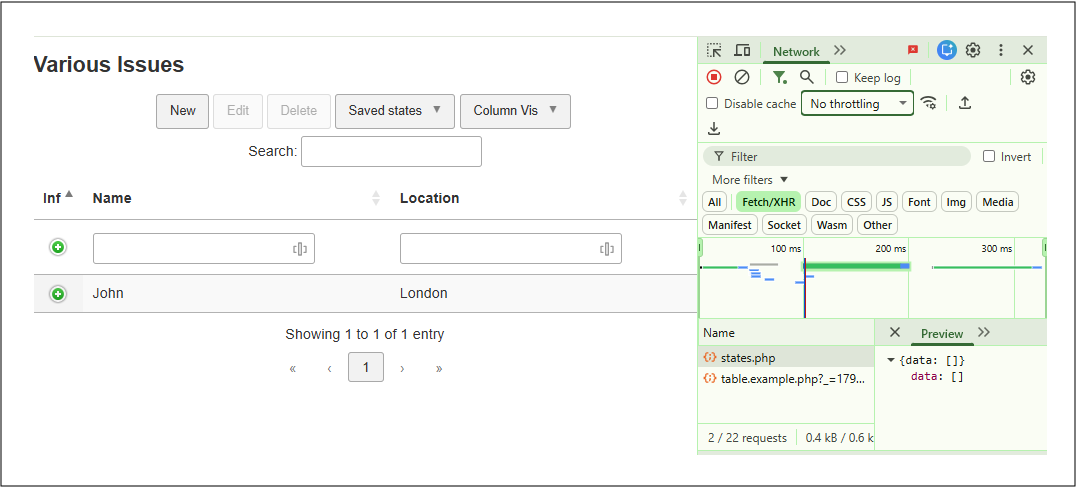
(a) If you doubleclick on the states.php file in the "Name" column of the Chrome developer console you get {"error":"Unknown action"}. Not sure whether this is important as everthing apprears to work fine.
(b) Question, is it possible to add columns (as opposed to change their names) to the default table structure as shown on https://datatables.net/manual/server/php/states as I was planning to add a "pagesize" field (desktop, Tablet Mobile).
(c) I am not able to change the various texts for StateRestore as defined at https://datatables.net/download/plug-ins/i18n/English.html. I cannot get the following "state" Language options to work. I am able to get "colvis" and "editor / create" to work as examples that do.
        language: {
            "buttons": {

                "colvis": "Column Vis",
                "createState": "Create Preset",
                "removeAllStates": "Remove All Presets",
                "removeState": "Remove",
                "renameState": "Rename",
                "savedStates": "Saved Presets",
                "stateRestore": "Preset %d",
                "updateState": "Update"
            },
            "editor": {
                "create": {
                    "button": "New",
                    "submit": "Submit",
                    "title": "Create new ZZZZ"
                },

            },
        },
2) columnControl
If I use the details-control configuration as shown in various examples in conjunction with columnControl, I cannot get rid of the details_open icon in the columnControl row. Do you know how I can remove it?
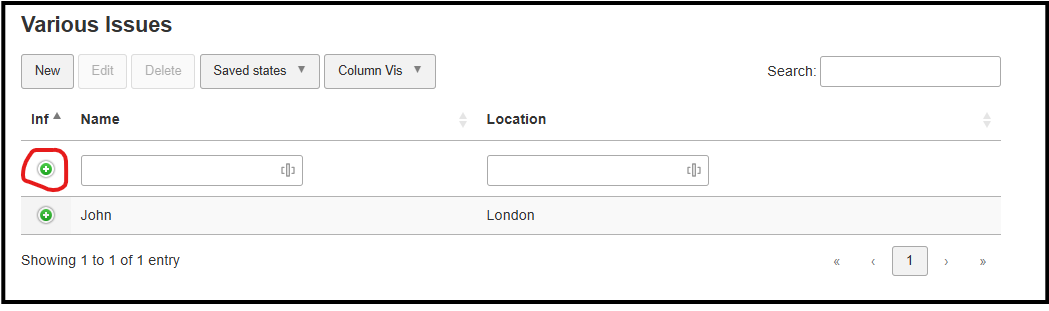
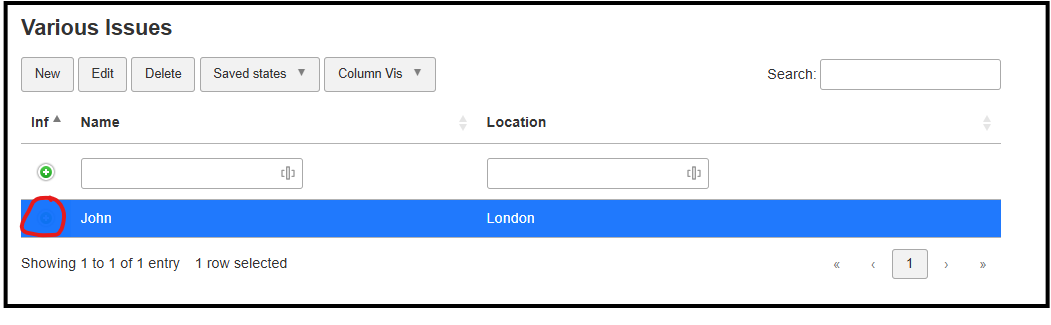
3) This issue can also be seen in V2. If a row is selected then the details_open icon is overridden by the "row selected colour" (blue in the example). Please can you help me making the details_open be in the foreground. (This was in V2)
html file --------------------------------------------------------------------------------------------------------------------------
<!doctype html>
<html>
<head>
<meta http-equiv="content-type" content="text/html; charset=utf-8" />
<meta name="viewport" content="width=device-width,initial-scale=1">
    <title>Issues</title>

    <link rel="stylesheet" type="text/css" href="css/generator-base.css">

    <link rel="stylesheet" href="https://nightly.datatables.net/css/dataTables.dataTables.min.css" />
    <link rel="stylesheet" href="https://nightly.datatables.net/buttons/css/buttons.dataTables.min.css" />
    <link rel="stylesheet" href="https://nightly.datatables.net/columncontrol/css/columnControl.dataTables.min.css" />
    <link rel="stylesheet" href="https://nightly.datatables.net/datetime/css/dateTime.dataTables.min.css" />
    <link rel="stylesheet" href="https://nightly.datatables.net/editor/css/editor.dataTables.min.css" />
    <link rel="stylesheet" href="https://nightly.datatables.net/select/css/select.dataTables.min.css" />
    <link rel="stylesheet" href="https://nightly.datatables.net/staterestore/css/stateRestore.dataTables.min.css" />

    <script src="https://nightly.datatables.net/js/dataTables.min.js"></script>
    <script src="https://nightly.datatables.net/buttons/js/dataTables.buttons.min.js"></script>
    <script src="https://nightly.datatables.net/columncontrol/js/dataTables.columnControl.min.js"></script>
    <script src="https://nightly.datatables.net/datetime/js/dataTables.dateTime.min.js"></script>
    <script src="https://nightly.datatables.net/editor/js/dataTables.editor.min.js"></script>
    <script src="https://nightly.datatables.net/select/js/dataTables.select.min.js"></script>
    <script src="https://nightly.datatables.net/staterestore/js/dataTables.stateRestore.min.js"></script>

    <script type="text/javascript" charset="utf-8" src="js/table.example.js"></script>
    <style>
        td.details-control {
            background: url('../images/details_open.png') no-repeat center center !important;
            cursor: pointer;
            z-index: 100000;
        }
        tr.shown td.details-control {
            background: url('../images/details_close.png') no-repeat center center !important;
            z-index: 100000;
        }
    </style>
</head>
<body class="dataTables">
    <div class="container">
        <h2>Various Issues</h2>
        <table class="display" id="table-example">
            <thead>
                <tr>
                    <th>Inf</th>
                    <th>Name</th>
                    <th>Location</th>
                </tr>
            </thead>
        </table>

    </div>
    </body>
    </html>
Javascript file
    addEventListener("DOMContentLoaded", function () {
        DataTable.key();

        var editor = new DataTable.Editor({
            ajax: 'php/table.example.php',
            table: '#table-example',
            fields: [
                {
                    "label": "Name:",
                    "name": "name",
                    "fieldInfo": "Enter Name"
                },
                {
                    "label": "Location:",
                    "name": "location",
                    "fieldInfo": 'Enter Location',
                }
            ]
        });

        var table = new DataTable('#table-example', {
            ajax: 'php/table.example.php',
            columns: [
                {
                    data: null,
                    className: "details-control",
                    orderable: false,
                    defaultContent: "",
                    width: "3%"
                },
                {
                    "data": "name"
                },
                {
                    "data": "location"
                },
            ],
            columnDefs: [
                {
                    target: 0, "width": "1%", columnControl: [
                        { target: 1, content: [] },
                    ]
                },
            ],
            columnControl: [
                {
                    target: 1,
                    content: ['search']
                },
            ],
            layout: {
                topStart: {
                    buttons: [
                        { extend: 'create', editor: editor },
                        { extend: 'edit', editor: editor },
                        { extend: 'remove', editor: editor },
                        {
                            extend: 'statesList',
                            buttons: [
                                'stateCreate',
                                'statesRemoveAll',
                                { extend: 'spacer', style: 'bar' }
                            ]
                        },
                        'colvis',
                    ]
                }
            },
            stateRestore: {
                ajax: '../php/states.php'
            },
            language: {
                "buttons": {

                    "colvis": "Column Vis",
                    "createState": "Create Preset",
                    "removeAllStates": "Remove All Presets",
                    "removeState": "Remove",
                    "renameState": "Rename",
                    "savedStates": "Saved Presets",
                    "stateRestore": "Preset %d",
                    "updateState": "Update"
                },
                "editor": {
                    "create": {
                        "button": "New",
                        "submit": "Submit",
                        "title": "Create new ZZZZ"
                    },

                },
            },
            select: true
        });
    });
Thank you in advance
Replies
Have removed the license key as I note that it was visible
Hi,
Unfortunately I haven't had a chance to dig into this today, but I will do so tomorrow and get back to you about the various points then .
.
Allan
Hi Alan, thank you. None of these are very important, so no mad rush.
That's okay. Chrome actually opens a new tab with that URL and it does it as a GET request with no data. So the server-side script doesn't know what the request is for, and thus correctly says the request is invalid. A 400 error would also be valid as the response here.
Kind of, yes. There is a
StateRestore->set()method which can be used to add additional information that is written to the db - e.g.:will write the date to the
updatedcolumn when a state is updated. However, there isn't currently a way to read that information back (because StateRestore wouldn't do anything with it!). The idea there was that you could use it for a condition, or for external auditing. What did you have in mind for what you would do withpagesize?That's an error in the language file - apologies. I haven't yet updated it for the changes in StateRestore 2 which reworked the language parameters. I'll get that done.
Change the CSS to be:
to scope it to just the
tbody. Otherwise it will apply to any cell with thedetails-controlclass andcolumns.classNamewill be used on cells in the header, body and footer of the table.That is happening because the show / hide icon is applied as a background image, while the row selection uses
box-shadowto highlight a row.What I think you would need to do is use a pseudo element - perhaps something like:
I don't actually have an example with those images easily accessible to demonstrate (and test!) that I'm afraid. The current child row examples use CSS for the show / hide state. That should work though!
Allan
Thank you very much Alan for sorting out of this out for me. I have managed to get all to work fine, however with the last item with the pseudo element, I had to make a small change to get it to work. (I do not know why though!).
For some reason I had to put some characters in the content property and make them transparent
Gah - that's me being daft. You could use
content: ' ';(i.e. an empty space). You need something for it to display so it actually shows up, simplydisplay: blockisn't enough. I had it half in mind since I putcontentin, and then forgot to put the space there.Good to hear you've got it all working now though
Allan