
Long Button collection option names are getting cut off
Long Button collection option names are getting cut off

If you create a button collection with long option names those names can get cut off. As you can see in this example:
https://live.datatables.net/yaleyaci/1/edit
the long name I added is getting cut off as the dropdown isn't sizing appropriately.
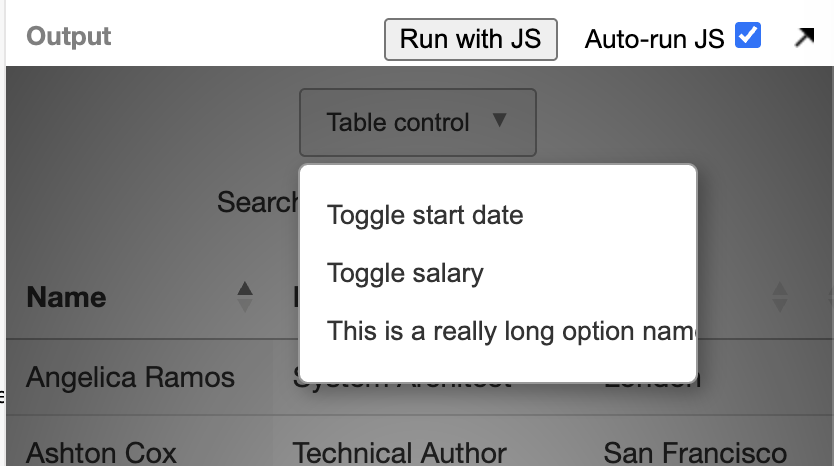
If you add this (it's commented out in the example) it fixes this behavior:
.dt-button-collection {
    min-width: fit-content;
}
Any chance this or something similar could be added to DataTables to handle long option names?
Thanks.
Ben
Answers
Hi Ben,
The long text should actually be getting displayed as ellipsis at the end:
Using:
Does achieve that: https://live.datatables.net/yaleyaci/3/edit .
I'm not 100% certain that is the right fix though. I'll look into this further.
Allan
Allan,
What if two options are the same except for the text that gets cut off? How would a user know which to pick? That would effectively limit users to names no longer than the width of the dropdown. Our users definitely use longer names than the currently available space. A tooltip would help but it's not ideal. Would it be possible to let it expand if there's room (there definitely is in the example you linked) and if not then show ellipses? To be fair, I don't know if the current fixed width was chosen for a good reason I'm completely missing though.
Thanks.
Ben
Yup, if you need the dropdown content to be wider, then a little piece of CSS (such as you've done, or setting the width explicitly, should be used. I thought I had a CSS variable for that width, but apparently not - I'll add that.
I've seen really long strings there before, which I why I prefer to have the ellipsis as the default, but with a simple CSS rule to enable wider layout if desired.
Allan
Allan,
Yeah, we have some users who are pretty verbose. That said, with the dropdown width set at 200px and the ellipses taking up a significant chunk of that what's left is awfully small. Looks like you get maybe 20 chars.
I tried to do something similar for the saved states dropdown but it's not working and I've no clue why.
https://live.datatables.net/kenicefa/1/edit
I tried adding this like I did for the other dropdown but no luck:
Oddly, I ended up adding this for our app instead and it worked but it doesn't work for the live example (it's commented out there).
Any idea what's going on and how to approach this? I figured the two dropdowns were basically the same and would respond similarly to that css override but apparently not.
Thanks.
Ben
Hi Ben,
The split buttons (those with a down arrow on the right of them) have slightly different markup and CSS. Specifically, the
buttoninside them isdisplay: inline-blockand is allowed to shrink right down. I think the styles indiv.dt-button-collection div.dt-button-split button.dt-buttonwill be clashing.I've just added this commit to allow the dropdown width to be assigned by a CSS variable, but it currently won't work with
fit-contentfor all cases as you are seeing, but it will allow the ability to easily set something like 300px, or what ever is better suited for your UI.Allan
Allan,
I've been playing around with the css and I've got both resizing now.
https://live.datatables.net/kenicefa/1/edit
Does that seem reasonable?
Thanks.
Ben
By the way, unless I'm missing it I didn't see an easy way to set a limit on the input field for the saved state name. We've got ours locked down to 100 characters in the db. It'd be nice if there were a way to set that in the StateRestore configuration. I ended up doing this:
It's obviously not ideal but it seems to get the job done.