Paging Index Hiding Columns in Second Ajax Call
Paging Index Hiding Columns in Second Ajax Call
 bluemoon2025
Posts: 11Questions: 0Answers: 0
bluemoon2025
Posts: 11Questions: 0Answers: 0
Hi,
I am using DataTables with AJAX in an ASP.NET MVC app, along with the latest Twitter Bootstrap, dynamic column building, column visibility buttons, and paging. I am migrating the datatable from 1.10 to latest.
First load:
DataTable loads correctly with column visibility functionality. After hiding columns: Navigating to the next page works fine. To recreate the issue, using column visibility and paging index is required in first step.
Second AJAX call:
Page loads correctly. Navigating to subsequent pages cause columns to remain hidden (<td> elements get display:none ) in style. Using the column visibility button refreshes datatable visibility and make the columns visible again.
<link href="https://cdnjs.cloudflare.com/ajax/libs/twitter-bootstrap/5.3.3/css/bootstrap.min.css" rel="stylesheet" crossorigin="anonymous">
<link href="https://cdn.datatables.net/2.3.5/css/dataTables.bootstrap5.css" rel="stylesheet" crossorigin="anonymous">

<link href="https://cdn.datatables.net/2.3.5/css/dataTables.dataTables.css" rel="stylesheet" crossorigin="anonymous">
<link href="https://cdn.datatables.net/buttons/3.2.5/css/buttons.dataTables.css" rel="stylesheet" crossorigin="anonymous">
<link href="https://cdn.datatables.net/responsive/3.0.7/css/responsive.bootstrap5.css" rel="stylesheet" crossorigin="anonymous">
<script src="https://cdnjs.cloudflare.com/ajax/libs/moment.js/2.29.4/moment.js" integrity="sha384-mFSRsfjTuXtihSLc/J0LxrFE1H9WRRllwGM6pxxyiYACkVdxRG82d3DQVlq8yXZM" crossorigin="anonymous"></script>
<script src="https://cdnjs.cloudflare.com/ajax/libs/twitter-bootstrap/5.3.3/js/bootstrap.bundle.min.js" crossorigin="anonymous"></script>
<script src="https://cdn.datatables.net/2.3.5/js/dataTables.js" crossorigin="anonymous"></script>
<script src="https://cdn.datatables.net/2.3.5/js/dataTables.bootstrap5.js" crossorigin="anonymous"></script>
<script src="https://cdn.datatables.net/responsive/3.0.7/js/dataTables.responsive.js" crossorigin="anonymous"></script>
<script src="https://cdn.datatables.net/responsive/3.0.7/js/responsive.dataTables.js" crossorigin="anonymous"></script>
<script src="https://cdn.datatables.net/buttons/3.2.5/js/dataTables.buttons.js" integrity="sha384-SyOBgiETMg1CpC29RFM/2e0S+rlVmbftfSjVTeG22H8ihiIwugfxQTWJ0dkEuqc7" crossorigin="anonymous"></script>
<script src="https://cdn.datatables.net/buttons/3.2.5/js/buttons.dataTables.js" crossorigin="anonymous"></script>
<script src="https://cdn.datatables.net/buttons/3.2.5/js/buttons.colVis.min.js" crossorigin="anonymous"></script>
 <script type="text/javascript">
     var tableReport = null;
     var reportFilters = {};

     $(document).ready(function () {
         FillReportFilters();

         tableReport = LoadDataAPI(reportFilters);

         $("#submit").click(function () {
             $('#reportTable tbody').empty();
             FillReportFilters();
             tableReport = LoadDataAPI(reportFilters);
         });
     });


     function FillReportFilters() {
         reportFilters.StartDate = "09/01/2026";
         reportFilters.EndDate = "09/12/2025";
     };

function BuildCols() {
    var cols = null;
    cols = [{
            className:"export",
            title: "Appointment Date",
            data: null,
            render: function () {
                return "2025-05-05"
            }
    }, {
        title: "Status",
        data: "Status"
    }, {
        title: "Title",
        data: "Title"
    }, {
        title: "Organiser",
        data: "Organiser"
        },
    {
        title: "Resource",
        data: "Resource"
    }, {
        title: "Location",
        data: "Location"
    }, {
        title: "Total Cost",
        data: null,
        render: function () {
            return "000"
        }
    }, {
        title: "Service",
        data: "Service"
    }, {
        title: "Email",
        data: "Email"
    }, {
        title: "Additional Email",
        data: "AdditionalEmail"
    }, {
        title: "Organisation",
        data: "Organisation"
    }, {
        title: "Approved by",
        data: "ApprovedBy"
    }
    ];
    return cols;
}

function LoadDataAPI(centreActivityFilter) {

    console.log(centreActivityFilter);

    var buildCols = BuildCols();

    if ($('#reportTable').html().trim() != "") {
        var table = $('#reportTable').DataTable();
        table.destroy();
        $('#reportTable').empty();
    };

    var table = new DataTable('#reportTable', {
        layout: {
            topStart: {
                buttons: ['colvis']
            }
        },

        pageLength: 3,
        lengthMenu: [[10, 100, 250, 1000, 10000, -1], [50, 100, 250, 1000, 10000]],
        "scrollY": 800,
        "scrollX": false,
        autoWidth: true,
        responsive: true,
        serverSide: true,
        processing: true,
        ordering: false,
        language: {
            loadingRecords: "<div><span class='spinner-border spinner-border-sm'></span> Loading..</div>",
            emptyTable: "No Result found..."
        },
        "ajax": {
            "url": '/Reports/LoadReportDataAPI',
            "type": 'POST',
            "contentType": "application/json",
            "cache": false,

            "data": function (d) {
                $('#reportTable tbody').empty();
                centreActivityFilter.DataTableViewModel = d;
                return JSON.stringify({ filters: centreActivityFilter });
            },

            "dataSrc": function (json) {
                return json.tableData.BookingList;
            }
        },

        columns: buildCols

    });

    return table;
}
 </script>
Replies
I think that is to be expected that the columns remain hidden. Are you wanting the hidden columns to become visible when going to another page? If yes, then look at using
columns().visible()to set the desired columns to visible in thepageevent.If this doesn't help then please provide details of the problem you are having.
Kevin
Yes, I was expecting the columns should be hidden based on the selected hidden columns, but seems moving to the second page index causes all the visible datatable columns hidden except the first.
Can you give me a link to a page showing the issue so I can look into it please?
Allan
Hi Allan, Unfortunately, I can not share any link for this issue, appreciate your suggestion to recreate the scenario.
Here is how it looks like when navigating to the next page.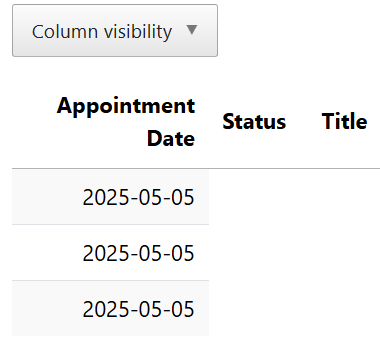
Even with all the columns visibilities are selected .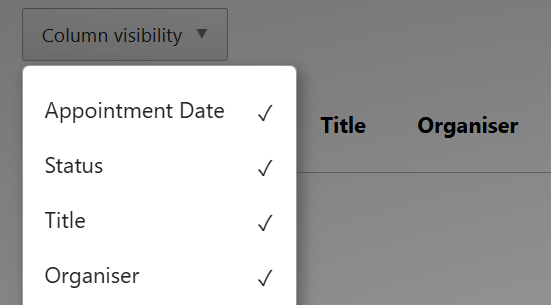
Tried with the update in the page event to make few columns visible but this does not change any columns.
That doesn't seem to happen in this example. Can you use live.datatables.net, JSFiddle or something else showing the issue so I can take a look please?
Thanks,
Allan
Based on your screenots it looks like you have columns with empty cells. Is this what you mean by hidden? For example the column Title is visible but there is no data and Column Visibility shows the column visible.
If this is the problem then start by using the browser's network inspector to look at the JSON response. Is the data in the response?
Kevin
The JSON response is same as before for first and second call. The data is there hidden style applied "display:none".
You have Responsive enabled, so it seems likely to be something to do with that. Unfortunately I can't debug screenshots, I'd really need a test case to be able to debug what is going wrong.
Allan
Here is a base example with server side processing, responsive and colvis. The example seems to work. Maybe you can update my example to show the issue.
https://live.datatables.net/yaroyala/133/edit
Note the URL will change when you start editing or you may need to clone it. Please post the new URL.
Kevin
Many thanks for the link. I have tried to reproduce the issue , so if you can use this link for the references.
https://live.datatables.net/tonajuni/1/edit
I updated the test case so it runs properly. First the server side doesn't like the
"contentType": "application/json"as it is not processing the sent data and returning all the rows. I removed that line.I added
columns.titleto populate the header after the$('#example').empty();statement.I updated the test case to use the CSS and JS includes you posted above.
The Datatable still appears to work properly when going between pages.
https://live.datatables.net/juxirosa/1/edit
Is there something significantly different in the response data when going from page 1 to page 2. for example the length of the data in the columns causing responsive to hide columns.
As a test try initialization Datatables to start on page 2 using
displayStart. You havepageLength: 3,so may usedisplayStart: 3,. What happens?Possibly there is an event that is firing that is modifying the page displayed. Do you have one of the Datatables events, like
page, defined?Could be a none Datatables event.
Kevin
Hi Kevin, Many thanks for apply the changes.
I can see the issue in the JS Fiddle now, By following the steps:
Step 1: Load data using the Submit ajax call. Make few columns invisible , then go to the next page index.
Step 2: Load the data again using the Submit ajax call (do not refresh page , Do not use any column visibility option in the second call),
then navigate to second page index .
The page should appear like this ,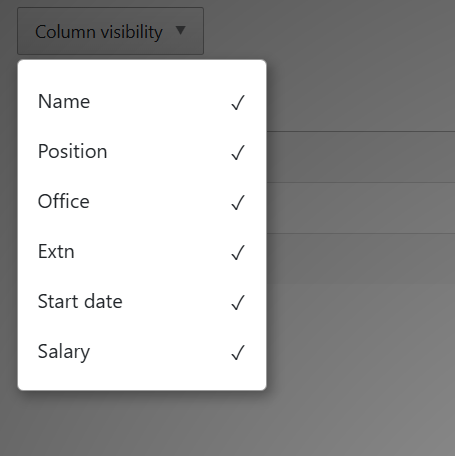
No, I have not used any page event defined in my code.
The datatable view is,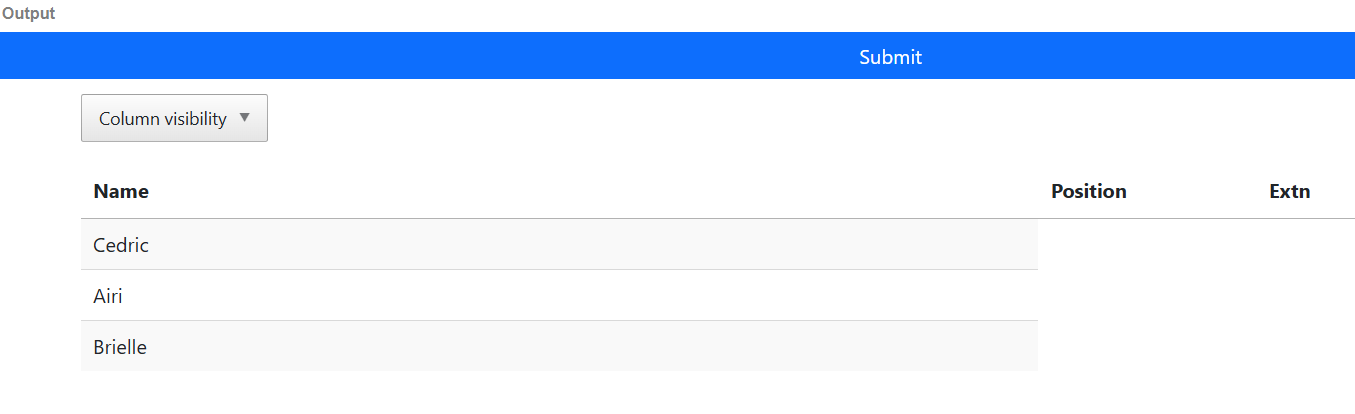
Good, I can replicate the issue now. It does look as though responsive may have something to do with the issue of setting the
tdelements withdisplay:none. Commenting out responsive the issue does not happen.@allan will need to take a look to debug.
Kevin
Thanks Kevin. Appreciate your support in this.
I'll take a look tomorrow morning. Many thanks to you both for the test case an instructions
Allan
It lead me on a merry dance this one. Turns out the problem was in Buttons - I had a mistake in the popover display method, which caused all
destroyevent handlers to be removed when the popover was removed! The wiped out the Responsivedestroyevent handler, and thus the wheels came off.I've committed a fix and it is now in the nightly build. I've updated the example here with the nightly build for Buttons.
The fix will be in the next release of Buttons which I'll aim to get out soon.
Worth noting in the example, there is a right mix of DataTables and Bootstrap 5 styling files and integration files. It would be worth using the download builder to make sure you get the right files if you are basing anything off this example.
Allan
Many thanks Allan for your support to resolve this issue. It is working fine with latest build, will update source accordingly when Buttons fix is released. Cheers