Control width of ColumnControl dropdown list
Control width of ColumnControl dropdown list
 Wernfried
Posts: 26Questions: 5Answers: 0
Wernfried
Posts: 26Questions: 5Answers: 0
On a server-side processing ColumnControl I get this dropdown list
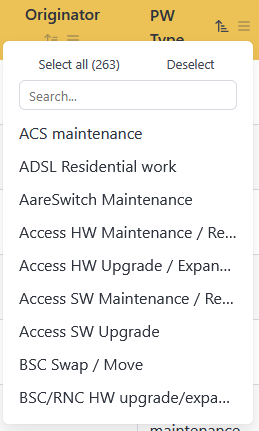
Is it possible to have bigger width?
Of course, I could set min-width or width in my CSS but then all columns get this width, even the smaller ones. I was not able to determine the according column when dropdown is created, it is a div created outside the main table element and I did not find any link to the column.
Using a dedicated class, e.g.
{
     name: 'type', data: 'type', title: 'PW Type',
      columnControl: ["order", [{ extend: "searchList", className: 'searchList-wide' }]]
}
does not work either.
Items for dropdown list are provided by ajax from server. So, content of dropdown is not known at initialization.
Any proposal?
This question has an accepted answers - jump to answer
Answers
Frustratingly, although I've defined the
classNameoption for searchList, it doesn't actually get used anywhere. I recall removing them from the other search types unable to think of why they would be needed. Looks like you've hit a use case!There is currently no way to target styles at a specific column's dropdown - it is either all or none at the moment I'm afraid.
I'll look at reinstating
classNamefor all of the search controls.Allan
I wish I had seen this before spending a couple of hours trying to do it. lol
I've committed a change that adds a new
dropdownClassoption to the-content dropdowncontent type and allows for exactly this sort of use case.Please note that this will ship in the next major version alongside DataTables 3 - so there might be a little bit of time before it drops.
Allan
@allan Are all these changes that you're making available in the nightly builds?
Not yet I'm afraid. Datatables 3 and the extensions will be promoted to nightly builds at some point in February (likely towards the end of the month), once I've updated all of the extensions.
Allan
@allan Sounds good, thanks!