Displaying Editor stacked fields in 2 rows

Displaying Editor stacked fields in 2 rows

lowrymellowrymel Posts: 33Questions: 8Answers: 0

This is a question around the Datatables as an Input example - Parent Child relationship.
Here is a screenshot of the userEdit screen.
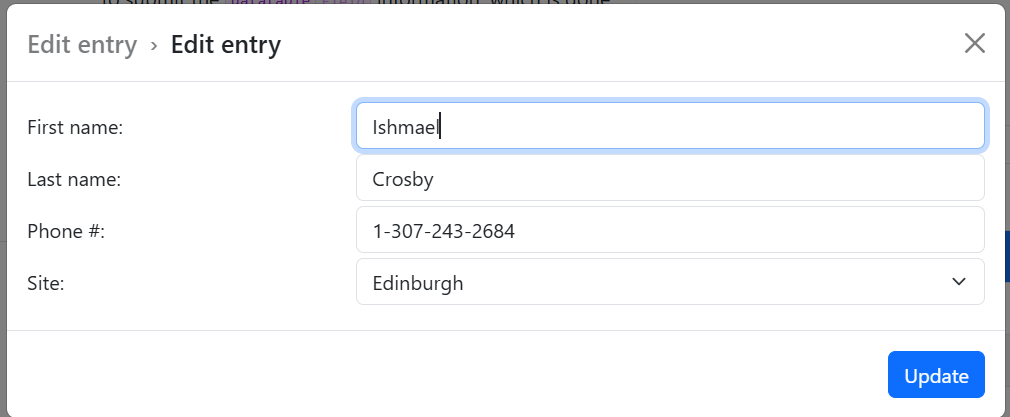
What I want to do is to put the First Name and Last Name on one row and the remaining 2 fields on a second row. Then I want them to go stacked when the screen is resized. BTW they are currently being displayed (my local version) using the settings of display: 'bootstrap' and bootstrap: { floatingLabels: true },
which increases the current screen white space even more leaving a lot of unused real estate.

Any assistance is greatly appreciated.
Thanks in advance!

This question has an accepted answers - jump to answer

Answers

  • allanallan Posts: 65,510Questions: 1Answers: 10,881 Site admin
    Answer ✓

    Hi,

    Great question! At the moment I think the only way to do something like {label} {input} {input} in Editor is to use a custom layout template and use CSS to hide the name of the fields while full size (putting in your own label - in this case "Name").

    You'd then use responsive CSS with your custom HTML to just show the regular labels in columns when a small screen is used.

    So possible, but not particularly quick or obvious I'm afraid. I'll have a think about how I can have something like this built in as that would be a nice touch.

    Allan

  • lowrymellowrymel Posts: 33Questions: 8Answers: 0

    Thanks very much! I am sure there are lots of priorities ahead of this but it will be awesome to see what you come up with.

  • lowrymellowrymel Posts: 33Questions: 8Answers: 0

    I figured it out. Here is an example of the HTML


    <div id="customFormChildPhoneEditor" class="bg-light border p-2 gx-1"> <div id="customForm" > <fieldset class="name border p-1 gx-1 w-100"> <div class="name-inputs"> <!-- Editor will append field controls into these divs --> <div data-editor-template="tbl_phone_number.number"></div> <div data-editor-template="tbl_phone_number.extension"></div> </div> </fieldset> </div> </div>

    and here is the CSS

    /* 
    ============================================
    CUSTOM-FORMS.CSS - Custom Form Layout
    ============================================
    */
    
    /* Keep your original customForm styles */
    #customForm {
        display: flex;
        flex-flow: row wrap;
    }
    
    #customForm fieldset {
        flex: 1;
        border: 1px solid #aaa;
        margin: 0.5em;
    }
    
    #customForm fieldset legend {
        padding: 5px 20px;
        border: 1px solid #aaa;
        font-weight: bold;
    }
    
    /* ============================================
       NAME FIELDSET - Full width with flex override
       ============================================ */
    
    #customForm fieldset.name {
        flex: 2 100%;
        min-inline-size: 0 !important;
        min-width: 0 !important;
        width: 100% !important;
        max-width: none !important;
        margin: 0.5em !important;
        padding: 0.5em !important;
    }
    
    #customForm fieldset.name legend {
        background: #bfffbf;
        margin-bottom: 0.5em;
    }
    
    #customForm fieldset.office legend {
        background: #ffffbf;
    }
    
    #customForm fieldset.hr legend {
        background: #ffbfbf;
    }
    
    /* General DTE Field styling */
    #customForm div.DTE_Field {
        padding: 5px;
    }
    
    /* ============================================
       NAME INPUTS - Flex container for inline fields
       ============================================ */
    
    #customForm fieldset.name .name-inputs {
        display: flex !important;
        flex-wrap: wrap;
        gap: 8px;
        width: 100% !important;
        max-width: none !important;
        margin: 0 !important;
        padding: 0 !important;
    }
    
    /* Each editor template wrapper */
    #customForm fieldset.name .name-inputs > div[data-editor-template] {
        flex-grow: 1 !important;
        flex-shrink: 1 !important;
        flex-basis: 0 !important;
        min-width: 200px;
        max-width: none !important;
        display: flex !important;
    }
    
    /* The DTE_Field container */
    #customForm fieldset.name .name-inputs .DTE_Field {
        flex: 1 !important;
        display: flex !important;
        flex-direction: column;
        width: 100% !important;
        max-width: none !important;
        padding: 2px;
    }
    
    /* Bootstrap floating label wrapper */
    #customForm fieldset.name .name-inputs .DTE_Field_InputControl {
        width: 100% !important;
        max-width: none !important;
    }
    
    /* Bootstrap floating label text */
    #customForm fieldset.name .name-inputs .form-floating label {
        white-space: nowrap;
        font-size: 1rem;
    }
    
    /* Input field itself */
    #customForm fieldset.name .name-inputs .form-control {
        width: 100% !important;
        max-width: none !important;
    }
    
    /* ============================================
       DARK MODE LEGEND COLORS
       ============================================ */
    
    html.dark #customForm fieldset.name legend {
        background: #005c00;
    }
    
    html.dark #customForm fieldset.office legend {
        background: #6a6a00;
    }
    
    html.dark #customForm fieldset.hr legend {
        background: #7e0000;
    }
    
    /* ============================================
       RESPONSIVE BREAKPOINTS
       ============================================ */
    
    /* Tablet: 2 fields per row */
    @media (max-width: 991px) {
        #customForm fieldset.name .name-inputs > div[data-editor-template] {
            flex: 1 1 calc(50% - 4px);
            min-width: 200px;
        }
    }
    
    /* Mobile: stack vertically */
    @media (max-width: 576px) {
        #customForm fieldset.name .name-inputs > div[data-editor-template] {
            flex: 1 1 100%;
            min-width: 100%;
        }
    }
    
    /* ============================================
       FIX: Override flex display for floating label fields
       Floating labels require block display, not flex
       ============================================ */
    
    #customForm .DTE_Field .form-floating {
        display: block !important;
    }
    
    #customForm .DTE_Field .DTE_Field_InputControl {
        display: block !important;
    }
    
    /* Ensure textarea fields specifically use block display */
    #customForm .DTE_Field_Type_textarea .form-floating,
    #customForm .DTE_Field_Type_textarea .DTE_Field_InputControl {
        display: block !important;
    }
    

    And here are the screenshots

    and

  • allanallan Posts: 65,510Questions: 1Answers: 10,881 Site admin

    Very cool - nice one. I've been pondering this over the weekend, and I think the answer will likely be to introduce a new field type which can take multiple child fields. Exactly how that will work with the API (or even with the internal data structure!) I'm not yet sure, but it is something I will continue to mull over.

    Allan

Sign In or Register to comment.