How to open the DateTime calendar on a specific month/year when the field value is empty
How to open the DateTime calendar on a specific month/year when the field value is empty
 ktadrowski
Posts: 36Questions: 8Answers: 0
ktadrowski
Posts: 36Questions: 8Answers: 0
Link to test case:
Debugger code (debug.datatables.net):
Error messages shown:
Description of problem:
We use Editor’s datetime field for a line-item date that must fall within a billing period. Our field config:
{
name: "line_item_date",
className: 'req-field',
label: "Some label",
type: "datetime",
keyInput: false,
displayFormat: localDateformat.dateFormat,
wireFormat: valueDateFormat,
},
We set min/max from the billing dates:
const dateField = editor.field('line_item_date');
dateField.minDate(formatToValueDateFormat(minDate));
dateField.maxDate(formatToValueDateFormat(maxDate));
When the billing period is in the past (e.g. Feb–Mar 2025) and the user edits a row with the date field empty, the picker opens on today’s month/year. Today is outside the range, so the year dropdown shows "-".
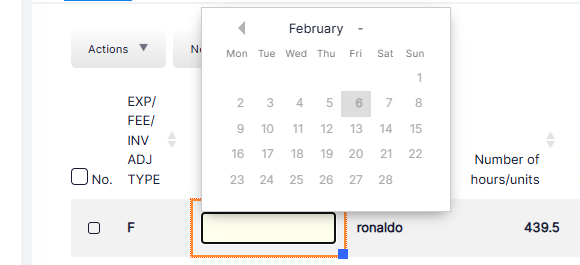
We know we could use nullDefault: true and def(minDate), but that would set a default date. We only want the calendar to open on a month/year inside the range and leave the value empty until the user picks.
Is there a supported way to control which month/year the calendar shows when it opens with an empty value?
This question has an accepted answers - jump to answer
Answers
I recently added a new
displayoption for DateTime, based on this discussion which I think will do what you are looking for.Add:
to your
line_item_datefield object and that should do it (assuming you are using the latest version of DateTime).Allan
Thanks for the reply, Allan.
Follow up question: Is it possible to set the calendar display after the Editor has been initialised, in the same way we can call
dateField.minDate(...)anddateField.maxDate(...)?For example, something like:
dateField.display(2025, 2); // open calendar on Feb 2025so we could set it from our code (e.g. when billing dates are known) instead of only via the initial opts.display config.
Yes, you can use the
field().inst()method on the field type to get theDateTimeinstance, and from there use its API methods. That includes the newdisplay()method.e.g.:
Allan
It would be great if we could set the display month once (like minDate/maxDate) so it’s applied whenever the calendar opens, instead of having to call display() on every form open and date-field focus.
Regardless, Thanks for confirming field().inst().display(year, month) - it’s working for us, and thanks for your help.
Bikash
Hi Bikash,
Thanks for the suggestion. I'll have a think about how that might be done. API-wise it could be a third parameter for .
.
display()to have it set the default, but I'll need to work out how to have that default work in DateTimeAllan