Responsive plug-in inline control alignment on right aligned first column
Responsive plug-in inline control alignment on right aligned first column
 chrisjshields
Posts: 8Questions: 2Answers: 0
chrisjshields
Posts: 8Questions: 2Answers: 0
With the datatables.net responsive plug-in, it is often the case that the responsive inline control will wrap with the first cell content, or appear out of alignment when the first/target column is numeric text-nowrap is added to the cell:
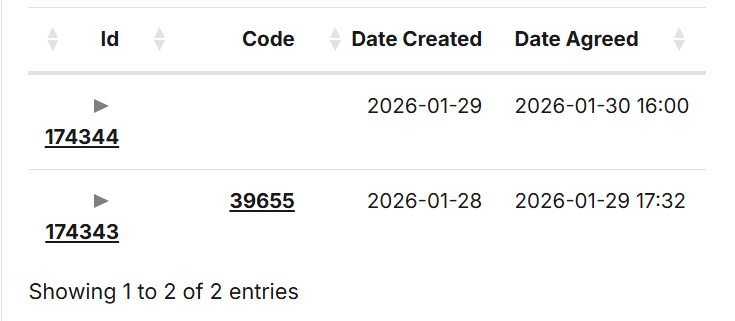
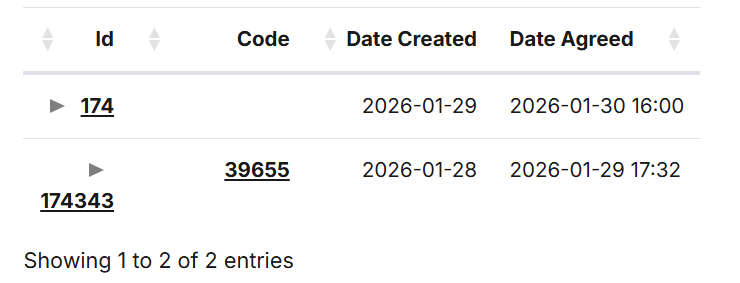
Is this the expected behaviour? Is there a recommended way of aligning the inline control to the left of the column when the content is right aligned (e.g. numeric)?
Thanks for any help.
This question has accepted answers - jump to:
Answers
Because the column is numeric, it automatically has the class
dt-type-numericassigned to it - that causes the right alignment.You could use
columns.classNamewithdt-leftto have it left aligned instead for that column.Another option is to have the responsive control in its own column.
Allan
Thank you for the response.
Both options work, but I wondered if the default behaviour could be improved upon. For now I have gone with the responsive control in its own column.
Thank you for this excellent piece of software!
The problem with changing the default behaviour for this is it is conditional on a number of things:
If Responsive isn't being used, then the numeric column should right align, like all numeric columns (that can be overridden).
So I could put a trap in for it, but it would make the default conditional, and I'm not sure about doing that!
Allan
Is there something the author of the responsive plug-in could do to force the control icon to the edge? (E.g. left in the standard config)
I am the author of the Responsive plugin. I guess it might be possible to have the icon be
position: absoluteand make the cellposition: relative. But I'd be worried about the layout for case where the text is left aligned.I'll have a look into options for that
Allan
Nice one, let me know if you do end up making any changes