v3 beta - header width while mounting Vue components in cell
v3 beta - header width while mounting Vue components in cell
 coreyg142
Posts: 11Questions: 1Answers: 0
coreyg142
Posts: 11Questions: 1Answers: 0
New thankfully more minor issue:
I'm doing a maybe somewhat hacky thing with createdRow to get Vue components mounted inside the table cells. This has been working fine, and still mostly does. However in v3 beta it's messing with the width calculations for the header row, they no longer match the actual width.
Before:
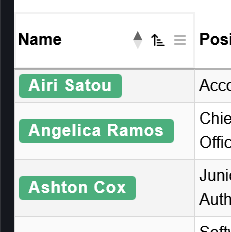
After:
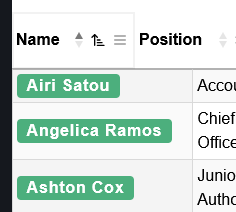
Notice the header cell does not align with the table cell.
test case: https://stackblitz.com/edit/koj9creq-km4mmuqj?file=src%2FApp.vue
Replies
Changing the rendered data in the table body, after DataTables has drawn the table, in a scrolling table, is a sure fire way of causing that issue. The column alignment issues don't get a chance to update to keep everything in line (I'm surprised that this is happening in the beta, but not v2 - I'd expect it to happen in both!).
The solution is to use slots:
I've updated your example here to use
<Tag>in a slot, and it works much better.Allan
The reason I didn't go with slots and instead did my weird hacky way was due to performance. I had found it was significantly slower to draw the table with slots than it was with this even with a low pagination size. Although admittedly that was before I made the table server side processed, so I'll give it another shot.
Seeing an issue with the columns that use slots not updating when the table changes (reorder, search, etc.). This only happens in v3, it works as expected in stable.
v3 behavior - https://streamable.com/pzhncr
stable working - https://streamable.com/ojmil0
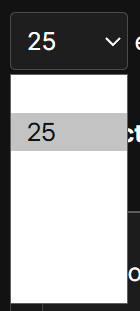
also one very minor nitpick - page size element is not styled properly in dark mode