v3 beta - header width while mounting Vue components in cell
v3 beta - header width while mounting Vue components in cell
 coreyg142
Posts: 12Questions: 1Answers: 0
coreyg142
Posts: 12Questions: 1Answers: 0
New thankfully more minor issue:
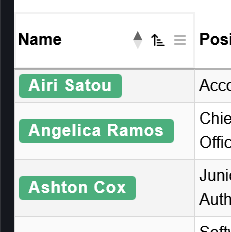
I'm doing a maybe somewhat hacky thing with createdRow to get Vue components mounted inside the table cells. This has been working fine, and still mostly does. However in v3 beta it's messing with the width calculations for the header row, they no longer match the actual width.
Before:
After:
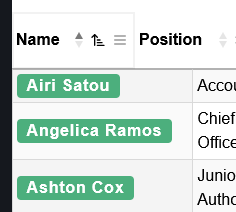
Notice the header cell does not align with the table cell.
test case: https://stackblitz.com/edit/koj9creq-km4mmuqj?file=src%2FApp.vue
Replies
Changing the rendered data in the table body, after DataTables has drawn the table, in a scrolling table, is a sure fire way of causing that issue. The column alignment issues don't get a chance to update to keep everything in line (I'm surprised that this is happening in the beta, but not v2 - I'd expect it to happen in both!).
The solution is to use slots:
I've updated your example here to use
<Tag>in a slot, and it works much better.Allan
The reason I didn't go with slots and instead did my weird hacky way was due to performance. I had found it was significantly slower to draw the table with slots than it was with this even with a low pagination size. Although admittedly that was before I made the table server side processed, so I'll give it another shot.
Seeing an issue with the columns that use slots not updating when the table changes (reorder, search, etc.). This only happens in v3, it works as expected in stable.
v3 behavior - https://streamable.com/pzhncr
stable working - https://streamable.com/ojmil0
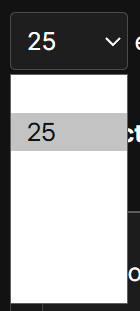
also one very minor nitpick - page size element is not styled properly in dark mode
Interesting that using a slot caused a performance issue. It should be that the slot was only "rendered" if the cell was being displayed. Although come to think of it, you might have paging disabled, given than you have scrolling enabled? That would kill any performance benefits there. Paging is always the best option for performance since it only shows a limited number of rows.
Interesting about the v3 sorting not updating slots for you. That doesn't seem to be the case in the example where it is working okay. Possibly a server-side processing artifact? If you disable server-side processing does it work okay?
Thanks for the pointer about the page size element and dark mode. It is actually getting a background colour applied to the
select, to make it match the other inputs, but it is an rgba one to tint it relative to whatever is in the background. The dropdown fails with that. I need to take a look into how to handle that!Allan
I can confirm it is only happening with server-side enabled.
Also re your first paragraph - paging was also enabled, I am using both.
Dark mode fix is here.
Regarding the server-side processing issue - I'll try to take a look into it this week, although I'm not certain when exactly (family holiday this week...).
Allan