
Minor styling issue with 'colvis' button
Minor styling issue with 'colvis' button
 Wernfried
Posts: 31Questions: 8Answers: 0
Wernfried
Posts: 31Questions: 8Answers: 0
I use DataTables with Bulma style and the button for column visibility looks like this
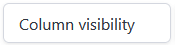
Generated HTML is this:
<button class="button buttons-collection buttons-colvis" aria-controls="dataTable" type="button" tabindex="0" title="Toggle column visibility" aria-haspopup="dialog">
    <span>Column visibility</span>
    <span class="icon is-small">
        <i class="fa fa-angle-down" aria-hidden="true"></i>
    </span>
</button>
It uses a Font Awesome icon, however Font Awesome library is not included neither in DataTables nor in Bulma library. Thus no icon is shown. I did not check whether this applies only to DataTables Bulma styling or to all styles.
You may add this definition to your CSS
.dt-icon--chevron-down {
  --svg: url("data:image/svg+xml,%3Csvg xmlns='http://www.w3.org/2000/svg' viewBox='0 0 24 24' width='18' height='18'%3E%3Cpath fill='black' d='M7.41 8.58L12 13.17l4.59-4.59L18 10l-6 6l-6-6z'/%3E%3C/svg%3E");
  display: inline-block;
  width: 18px;
  height: 18px;
  background-color: currentColor;
  -webkit-mask-image: var(--svg);
  mask-image: var(--svg);
  -webkit-mask-repeat: no-repeat;
  mask-repeat: no-repeat;
  -webkit-mask-size: 100% 100%;
  mask-size: 100% 100%;
}
and use <i class="dt-icon--chevron-down" aria-hidden="true"></i>, then the button looks as intended
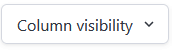
Note, icon data is taken from
https://icones.js.org/collection/mdi?s=down&icon=mdi:chevron-down
https://icon-sets.iconify.design/mdi/
Kind Regards
This question has an accepted answers - jump to answer
Answers
Darn. I thought FontAwesome was the icon library used by Bulma, and it is mentioned here and used on their site, but it looks like they do allow other icons as well, such as Material Design.
I've included FA on the Bulma example pages, but I do see that is optional.
Thanks for pointing this out! I'm not sure I'll get the fix in for the new release, but I've got a note of it to address now.
Allan
Fix committed here. I've used
@layerin CSS to provide a fallback so if FA is not loaded, then a simple triangle is used. Otherwise, if FA is loaded, it will continue exactly as it was before.Thanks again for flagging this up.
Allan