
Several issues with DataTables after migrating from v2.3.8 to v3.0.0 (Bootstrap 4)
Several issues with DataTables after migrating from v2.3.8 to v3.0.0 (Bootstrap 4)
 slolo
Posts: 154Questions: 29Answers: 2
slolo
Posts: 154Questions: 29Answers: 2
Link to test case: https://live.datatables.net/sejuwogu/1/edit
Debugger code (debug.datatables.net):
Error messages shown: datatables.min.js:30 Uncaught SyntaxError: Failed to execute 'matches' on 'Element': ':visible :not(.no-col-exportable, .no-col-printable)' is not a valid selector.
Description of problem:
Problem n°1:
Click the "Column visibility" button, and the menu will not appear.
I think my problem with the buttons is very similar to the one described in this link:
https://datatables.net/forums/discussion/81839/datatables-3-buttons-dont-work-in-bootstrap-4#latest
Problem n°2:
Click on a button (copy for example) to see the error message :
Uncaught SyntaxError: Failed to execute 'matches' on 'Element': ':visible :not(.no-col-exportable, .no-col-printable)' is not a valid selector.
I have read the upgrade note for "CSS selectors" but I don't know how to do it directly in dataTable initialization.
https://datatables.net/download/upgrade/core/3.0/upgrade#CSS-selectors
Problem n°3:
As you can see, pagination is broken when you try to display all rows at initialization
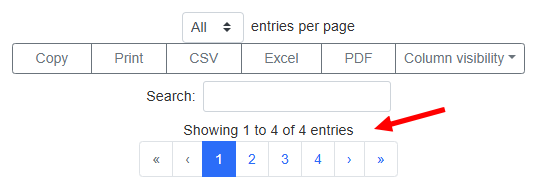
Problem n°4:
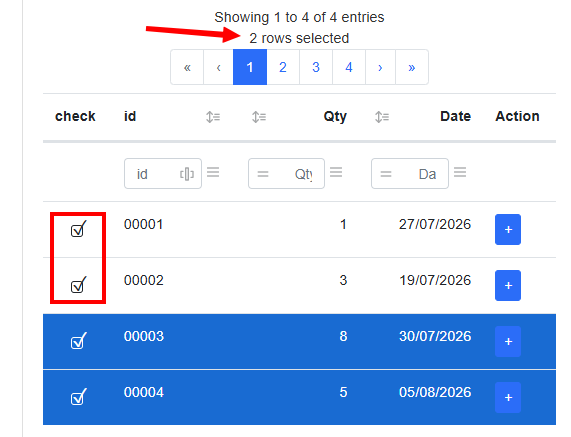
Check all checkbox.
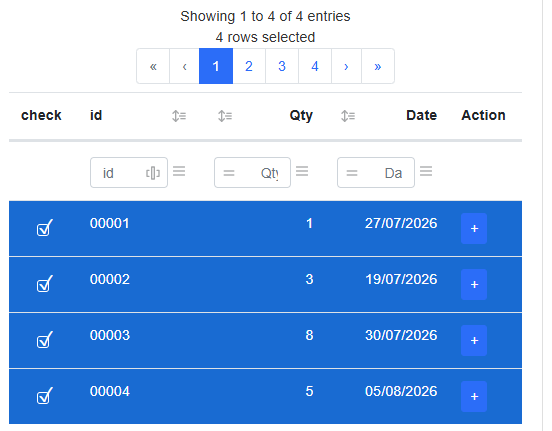
Then move the second column to the left
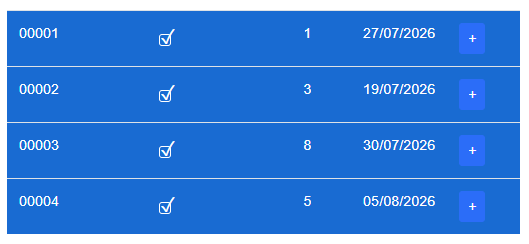
Then uncheck the first two lines (for example)
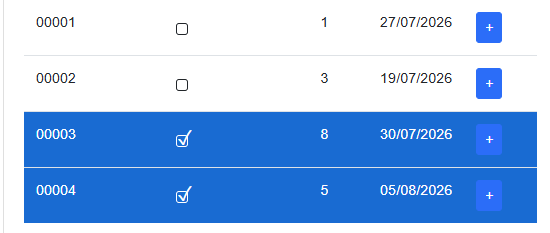
Now, move the first column to the right (to its initial position)
You will see that all checkbox are checked whereas the text says "2 rows selected"
Problem n°5:
Why I have to put {type : null} instead of {type : "date"} for making filter on date to work
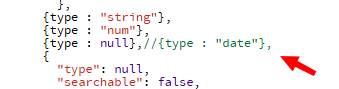
Replace "null" with "date" for the type of column 3 (the fourth column) and try filtering by the date 27/07/2026, for example.
The filtering no longer works.
Question:
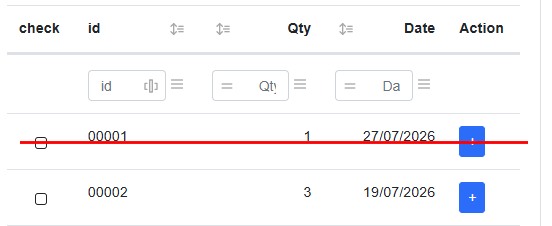
Is there a simple way to vertically align all cells content?
Let me know if you want me to make a video to show the problems.
Thank you in advance for your help, and have a good day.
Lolo.
Answers
Hi Lolo,
Many thanks for your questions!
1 - Column visibility not appearing
As you say, that will be the issue you linked to. There is a workaround in that thread, and a fix has been committed. I'll get that fix released this week.
2 - Selector
This is one of the places that demonstrates how much jQuery gives us without us needing to think about it . The
. The
:visibleselector is not a valid CSS selector - it is a (useful) jQuery extension. What I might need to do is add a secondary option to the export options to toggle the export of visible columns. That could serve as the basis for what columns then get selected from thecolumnsstring. Or maybe there is another way? I'll have a think about this - I don't have an immediate fix, but I can see that being important for this sort of thing.3 - Paging when -1 is selected
Thanks for letting me know about that error. I've committed a fix, and that will be included in DataTables 3.0.1 which I'll release later this week (Thursday or early Friday).
4 - Select count wrong
Can you link to a test case showing this issue please? I've just tried to recreate it here but wasn't able to do so.
5 - Date type
Don't set the
columns.typeoption. Let DataTables figure out the data type for the column. If you override it, unexpected things will happen, such as in this case! If you are needing to force it to a particular type, then it means that it hasn't detected the data type correctly, and it won't be able to handle the data in it. Or worse, setting it to a type that it doesn't know for that column's data. I actually regret putting in the ability to set the data type manually. Don't set the type - let DataTables figure it out.6 - Vertical alignment
Add:
to your CSS.
Allan
Hi @allan,
Thanks for your reply.
2 - Selector
I hope you will find a trick because I use this behavior a lot in my code
**3 - Paging when -1 is selected
**
Thank you for the fix.
4 - Select count wrong
I updated my test case to keep only the necessary source code.
https://live.datatables.net/fohupiwa/1/edit
I have made a video in order to show you how to reproduce the bug:
https://streamable.com/t7847r
5 - Date type
I understand what you're saying, but it is still strange that it doesn't work when specifying a precise data type for a column that actually contains that exact type of data.
Then again, it might be due to incorrect date formats (using DD/MM/YYYY) when the format actually expected for a date column is likely YYYY-MM-DD.
Could that be the reason?
6 - Vertical alignment
It's really strange, and it doesn't seem to be working.
Thanks for the test case. Something funny certainly happening there! I'll let you know what I find.
Yes, it is almost certainly because it is a formatted date. If you remove the manual setting of the
typeproperty and then usecolumn().type()on that column, you will see what the data type is that DataTables has automatically assigned to it. There is a good chance it will include formatting information, and that is what ColumnControl (and other aspects) use to operate on. Thedatetype is ISO8601 only.My mistake, it should be
vertical-align: middle. MDN docs here.Allan