
CardView with ServerSide causes repeated Ajax calls on resize
CardView with ServerSide causes repeated Ajax calls on resize
 lilbud
Posts: 6Questions: 2Answers: 0
lilbud
Posts: 6Questions: 2Answers: 0
Link to test case: N/A
Debugger code (debug.datatables.net): N/A (debugger error: "Uncaught TypeError: can't access property "length", table.aoData is undefined")
Error messages shown: N/A
Description of problem:
When using the new CardView with a server side loaded Datatable, there is an issue where Ajax requests are sent on every single resize of the window (no matter how small). The request is also fired twice on initial page load as well. Disabling CV fixes this but I'm unsure why CV being enabled causes these issues in the first place.
Here is the table init code:
      var table = $('#eventTable').DataTable({
        ajax: '/api/v1/events/?year=1978&format=custom',
        columns: columns,
        cardView: true,
        responsive: true,
        serverSide: true,
        processing: true,
      })
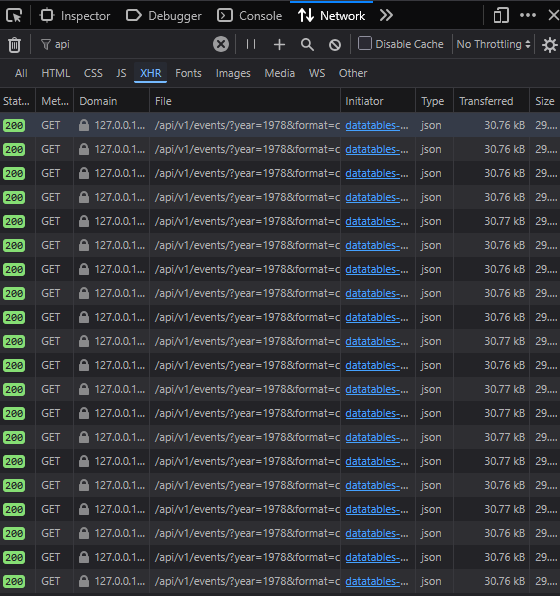
The ajax request refires on every single window resize, even if the window only grows 1px. Initially I assumed it refired the request on switching from table to card but that isn't the entirely the case. Above is the network tab after resizing the window maybe 10 or so pixels.
I am using the latest version of Datatables with the following selected: https://datatables.net/download/#bs5/moment-2.29.4/dt-3.0.0/b-4.0.0/cv-1.0.0/cc-2.0.0/date-2.0.0/fc-6.0.0/fh-5.0.0/r-4.0.0/rg-2.0.0/sb-2.0.0.
I couldn't get the Live site to work with serverSide/Ajax data (some error about Same Origin Policy), and the debugger gave an error upon trying to submit. If any other code/info is needed feel free to let me know.
This question has an accepted answers - jump to answer
Answers
Hi,
Many thanks for letting me know about this error. It is related to the page length control and
draw()being called on each update. I've got a fix for that specific issue now, but while look at that I've realised that the page length restore when state saving doesn't work correctly for CardView. I'm looking into that just now and will post back when I've got a fix.Regards,
Allan
Hi,
Just to say, I've committed a fix to address this issue and also the state saving one I noticed. I'll tag and release CardView 1.0.1 tomorrow alongside DataTables 3.0.1.
Many thanks again for letting me know about the error.
Allan
Thanks Allan for fixing that issue, can confirm the requests no longer fire like crazy.
Although this seems to have introduced a new issue where the cards don't load on page 1 when cardView is set to either "true" or "mode: auto". If the view is set to cards then Page 1 works.
This can actually be verified on the basic initialization page: https://datatables.net/examples/cardview/initialisation/simple.html. The cards should appear at <900px but they don't. Going to page 2 will load the cards and going back to page 1 will show the page 1 cards.
Additionally on my end, starting at desktop size, resizing to mobile to see the cards, and expanding again shows an infinite processing indicator. The data is loaded and usually navigating pages or sorting will remove it. But this didn't show on CV 1.0.0.
Darn it. Apologies - I will have a look and see what has gone wrong there.
Allan
I've just committed a change that addresses this issue. Are you able to try out the nightly build to make sure it works okay for you as well please?
Many thanks,
Allan
Yes that fixes the cardView issue.
The issue of the processing indicator showing after returning to table view is still present. Only when the cardView is "auto" or "table" and switches views based on breakpoint. Using the button toggles to switch doesn't do this.
It happens at all responsive breakpoints, even when responsive is set to false. This is new to 1.0.1 (both the nightly you sent and the public version).
Thanks again for all the help
I missed that point - apologies. I've committed a change and the nightly build has the update (note the cache busting query parameter on it to make sure the newest version is loaded!).
Allan
Yes thank you, that fixed the processing issue. CardView fully works on my end now.
Thanks again for all the help Allan