
DataTables 3.1.2 - FixedHeader column widths become misaligned with Responsive
DataTables 3.1.2 - FixedHeader column widths become misaligned with Responsive
 tenobe4350
Posts: 7Questions: 1Answers: 0
tenobe4350
Posts: 7Questions: 1Answers: 0
Hi,
I'm experiencing a column alignment issue with DataTables 3.1.2 when using FixedHeader together with Responsive.
My table contains a large number of columns. When the table is initially displayed, everything is correctly aligned: the table header and body columns have the correct widths.
However, when I scroll down and FixedHeader becomes active, the floating/fixed header is no longer aligned with the table.
The actual table columns keep their correct widths, but the FixedHeader floating header calculates different widths, causing the <th> elements in the fixed header to no longer line up with the corresponding columns in the table body.
The issue is particularly noticeable when there are many columns and Responsive is enabled.
The behavior is:
1 - The page loads and the DataTable is correctly aligned.
2 - Responsive determines which columns should be visible.
3 - The table header and body are correctly aligned.
4 - I scroll down.
5 - FixedHeader becomes active.
6 - FixedHeader calculates the widths of its floating header.
7 - The calculated widths don't match the widths of the original table.
8 - The floating header therefore becomes horizontally misaligned with the table body.
It looks like the FixedHeader width calculation in DataTables 3.1.2 is not using the final column widths from the original DataTable layout, particularly when Responsive is also managing a large number of columns.
The important thing is that this behaviour did not occur in previous versions. With the older DataTables versions, the FixedHeader remained correctly aligned with the table.
I'm currently using:
DataTables: 3.1.2
FixedHeader
Responsive
Example configuration:
new DataTable('#example', {
responsive: true,
fixedHeader: true
});
Could this be a regression in DataTables 3.1.2, specifically in the way FixedHeader calculates or copies the column widths when it becomes fixed?
It seems that the original DataTable has the correct widths, but the cloned/floating FixedHeader does not receive or calculate those same widths correctly.
I would appreciate any advice on how to make FixedHeader use exactly the same column widths as the original table, or whether this is a known issue in DataTables 3.1.2.
Thanks!
Answers
Can you link to a page showing the issue please? I've just tried it and haven't been able to recreate it, so I must be missing something. Here is my example: https://live.datatables.net/limamagi/1/edit .
Allan
Hi Allan,
Thanks for taking a look at this.
I've attached a screenshot showing the column misalignment when the FixedHeader becomes active.
I've also modified the example you provided so that it uses Bootstrap 5, as that is the environment where I'm seeing the issue. With Bootstrap 5 and the larger number of columns, I'm able to reproduce the problem.
Hopefully the modified example and the screenshot make it easier to reproduce and identify what is causing the FixedHeader column widths to differ from the original table.
Thanks again for looking into it.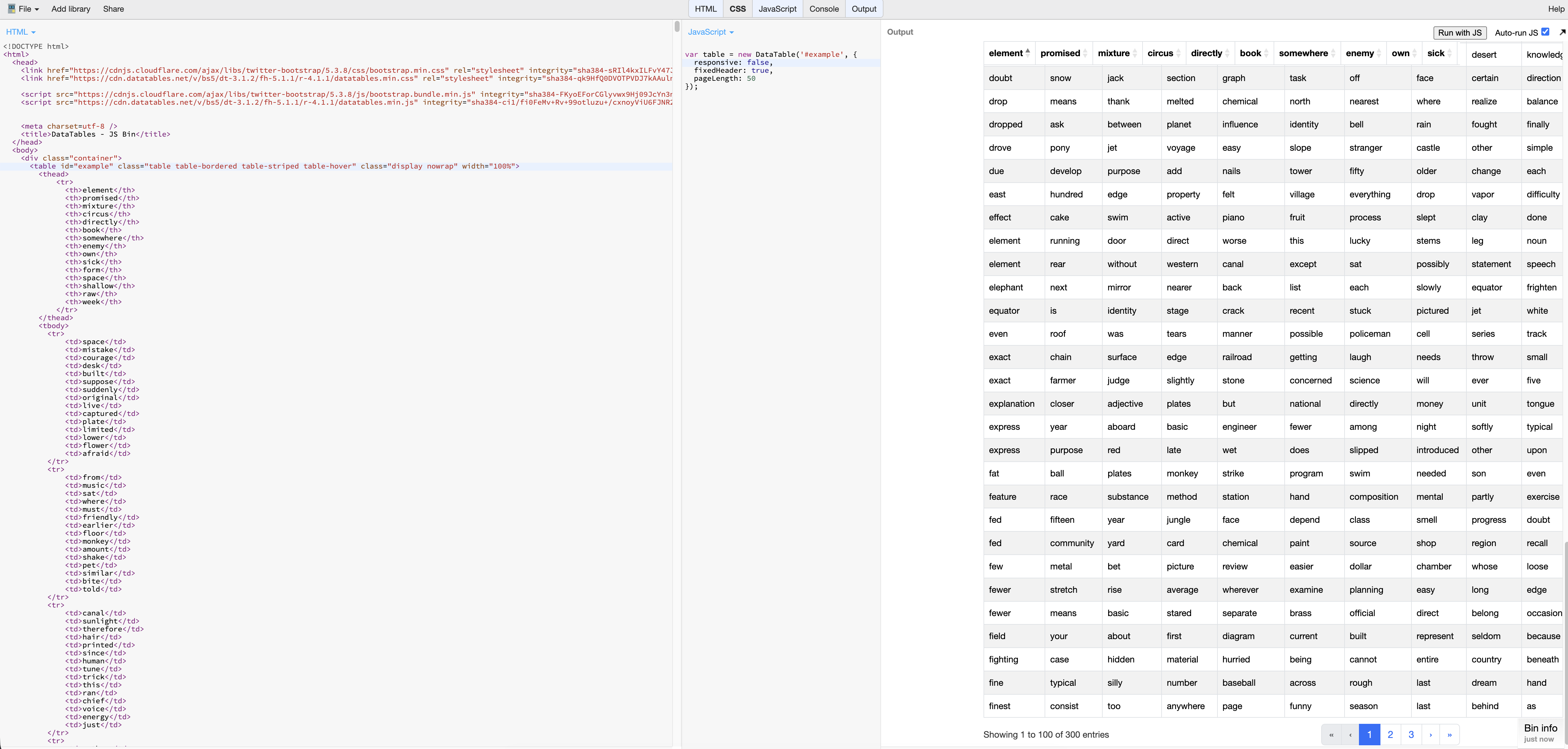
https://live.datatables.net/limamagi/3/edit
Interesting one! Many thanks for this - I do indeed see the problem, although only with Chrome, not Firefox. I'll dig into this tomorrow and get back to you.
Allan
Many thanks again for letting me know about this. It was indeed an interesting one with a difference between how Firefox and Chrome calculate margins. I've worked around it with this commit and it is now in the nightly build.
I've updated your example to use the nightly, and it looks good now.
This change will be in the next patch release of FixedHeader.
Regards,
Allan
Hi Allan,
Many thanks for the quick fix and for updating the example to use the nightly build. I really appreciate it.
I've tested the nightly and the alignment is now correct when I don't set any width on the <th> elements. However, the problem still appears when I set an explicit width on a column, for example:
html
<th width="300px">Name</th>
In that case the floating fixed header no longer lines up with the table columns, and the misalignment is back, just as it was before the fix.
I'm attaching a link to an example that reproduces the issue using the nightly build:
https://live.datatables.net/limamagi/10/edit
In the example, you'll see that the header aligns correctly when no width is set, but breaks as soon as width="300px" is added to a <th>.
Let me know if you need anything else from me.
Thanks again for your time and help.
Best regards,
Column widths are the gift that keep on giving . In this case we have multiple competing elements - the columns are defined as 300px * number of columns. The table is 100% width, in a container which is max-width: 800px. Even without that though, the browser will try to keep a 100% width table in the viewport, thus overriding the column widths.
If you want 300px for the columns, use:
to tell the browser you know what you are doing and ignore its own calculations.
I absolutely acknowledge that FixedHeader shouldn't be misaligning in your example though. I'll look into that shortly and get back to you when I know a little bit more about that.
Allan
I agree with your explanation regarding the column widths and table-layout: fixed.
However, what I'm noticing is that this behavior did not occur in version 1.11.0. The issue started after upgrading to the 2.0+ versions.
So, while I understand that the browser's layout calculations can explain the behavior, the fact that the same setup worked correctly in 1.11.0 makes me think there may have been a change in the FixedHeader/table width calculation between those versions.
In particular, the misalignment with FixedHeader is what I'm trying to understand, since the same table configuration didn't require table-layout: fixed in 1.11.0.
Thanks for looking into it!
Yes, there have been a lot of changes in how the column widths are handled, some for efficiency, some to address other bugs. There will have been other issues in 1.11 that maybe aren't triggered by your code.
In this case, what is happening is that DataTables "worst case" table (which is how it calculates the sizes to apply to each column - it includes the custom width applied as well as long strings) is actually using slightly different column widths than what is displayed, because again, the browser attempts to collapse the width of the table if it can. So for example, the first column needs to be 120px to fit "arrangement" into it, but it isn't shown on the first page, so the browser collapses it down.
That is a problem, because now the widths don't match what is expected, and are content dependent. Some headers are wider than the content, and some content is wider than the header. It makes a right mess.
What I've done is to commit a change that tells the fixed header to trust the widths given to it.
That fixes the issue in your latest example.
Are you able to confirm if that addresses the issue in your app? The FixedHeader examples all seem fine, but then they were before as well. It was the width soup that was causing the issue here .
.
Allan
Yes, I can confirm that it's working correctly now. The columns are aligned perfectly, and the issue from the previous example is completely fixed.
Thanks for the quick fix!
Awesome. I'll get a patch release out, probably on Friday.
Allan
Hi Allan,
I've noticed another issue that might be related to FixedHeader.
In my case, the table contains around 500 records, but when the floating header is enabled, sorting becomes significantly slower. There is a noticeable delay when clicking column headers to enable or disable sorting.
Without FixedHeader enabled, sorting works much faster and more smoothly.
Could this be a performance issue with FixedHeader, possibly related to how it interacts with Responsive?
Thanks!
Very possibly. Interaction between the components, as they modify the DOM, can be quite complex. Also, it depends how you are display the records. Are you displaying all 500 rows at the same time? If so, then that is going to be requiring a lot of DOM calculations for both aspects.
I've created this little test case: https://live.datatables.net/nagujupo/1/edit . Can you confirm if it is showing what you are seeing? Increase the number of rows per page and it slows down a bit.
Allan
Yes, I can confirm that I'm seeing the same behavior as in your example. Increasing the number of rows per page also makes it slower.