
Autofill control bleeding through fixed columns
Autofill control bleeding through fixed columns

I'm in the process of upgrading from DataTables 2 to 3. and running into an issue. We're using FixedColumns with KeyTable and AutoFill. There appears to be some odd interactions between the extensions as you can see in this example:
https://live.datatables.net/coguzoga/1/edit
If you select a cell that's not fixed and scroll the control appears above the fixed column (and is still reachable). If you select a cell that is fixed and scroll the other columns the control moves but shouldn't. We're seeing something similar and this also includes the actual cell text for that row as well as error highlighting that we're doing for the cell bleeding through.
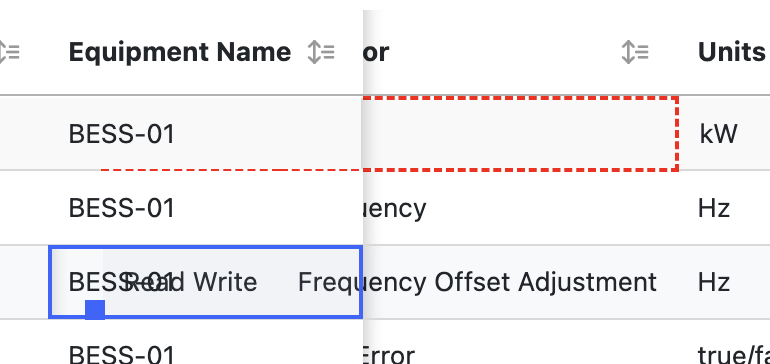
Any chance this is a DataTables bug?
Thanks.
Ben
Answers
I've committed a fix to KeyTable for the text bleeding through.
The position of the drag handle is proving to be a bit more difficult. I'll post back when I've figured out what to do with that!
The red dashes, I can't reproduce that. Do you know what CSS setting is causing that?
Allan
Fixed the drag handle positioning with this commit. Thanks for letting me know about those errors .
.
I'm going to do some releases tomorrow and these fixes should be included.
Allan
Allan,
Thanks for tracking that down. The red dashes is something custom we're doing to let users know when the validation for the cell comes back with an error (we provide a tooltip as well to show exactly what's wrong):
It done setting a class on the cell:
and this is the css:
It's getting called in the rowCallback so users can see cells validate in real time as they're editing the "spreadsheet".
I didn't bother trying to reproduce it in the live editor as I was hoping it would just automagically get fixed as a side effect of the patches you just created. Does that seem likely or do you need me to try to update the live example to match?
And I should probably ask while I'm thinking of it if the code above is a reasonable approach or if there's a better way.
Thanks.
Ben
I thought it was probably a border, but couldn't replicate the bleed through from it. Here is a little example: https://live.datatables.net/coguzoga/2/edit . I've tried Chrome and Firefox, but both seem okay.
Allan
Allan,
I'm updating my npm package list to grab the latest changes and I'm able to pull everything except AutoFill:
Any chance that one is on the way this morning as well?
Thanks.
Ben
Hi Ben,
Sorry about that. That's AutoFill 3.1.3 published on NPM now.
Allan
Allan,
No worries. Now I'm getting this error instead.
Does it take time to finish publishing and become available?
Thanks.
Ben
Never mind. It's available now.
Yeah, there can be a minute or two when they are slightly out of sync. That's something I hope to address in the build infrastructure with future updates .
.
Allan
Allan,
I've got it loaded up and I'm seeing slightly less (but not no) bleed-through for the AutoFill handle, the KeyTable outline and the error validation outline (our custom highlighting). The thing where I was seeing text bleed through seems fixed. I tried to take a similar screenshot as the one above. Pretty weird.
This is loaded up in a Bootstrap modal with a bunch of tabs each with a DataTables instance in it so maybe there's something odd going on there. I'll start digging into it and let you know what I find.
Thanks.
Ben
Interesting. I've updated your example to use the latest versions and it seems better there, but maybe there is something about the modal that is throwing things off? If you are able to create a test case that shows the issues I'll take a further look into it.
Allan
Allan,
Got a bit sidetracked today. Back to digging through this. I thought I'd mention that in the example you updated I noticed the autofill handle is still bleeding through.
Thanks.
Ben
Allan,
Still digging. I updated the example to show what we're doing for validation.
https://live.datatables.net/kokuloso/1/edit
The commented out line in the css is what I used to have.
As you can see the border bleeds through.
I replaced that at Copilot's suggestion:
That seems to help:
It seems to be pushing that border/outline inward into the cell by a pixel which helps with the bleed-through. Oddly I'm getting the same sort of bleed-through with the selected cell blue outline as you can see. Not sure why yet. If this makes any sense to you I'd definitely be happy to have any advice. And yes, it's pretty weird that it's happening here but not in your example. No clue why. I'll keep looking into this on Monday.
Thanks.
Ben
Hi Ben,
What browser / OS are you using? I strongly suspect the 1px border bleed is a browser rendering error. I've just tried both Firefox and Chrome (Linux) and they are working okay:
The position of the drag handle appears to be okay as well. Possibly that is a browser quirk as well, although I'd be surprised by that one as it is a simple positioning in the cell for the fixed columns and in the table's container for the scrolling columns.
Allan