
Styling issue with Dark mode in Bulma
Styling issue with Dark mode in Bulma
 Wernfried
Posts: 61Questions: 14Answers: 0
I use Bulma dark styling as advised in Dark mode:
<html class="theme-dark dark" data-color-scheme="dark" data-theme="dark">

<table class="table is-bordered is-striped is-hoverable" id="dataTable"></table>
and table looks like this
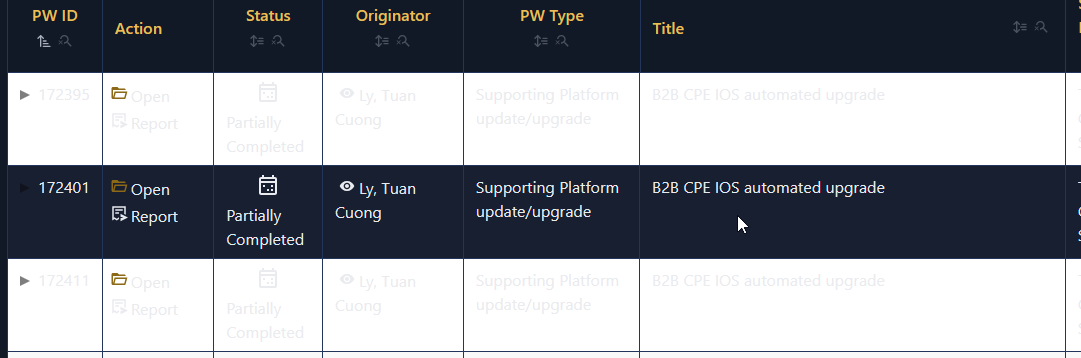
However, when I adddata-bs-theme="dark" then the table looks fine. But I don't think this is by intention.
Kind Regards
Wernfried
This question has an accepted answers - jump to answer
Answers
Hi Wernfried,
On this page, with Bulma and dark mode selected, if I run:
in the console, it appears okay.
I see you've got arrows in the first column, which suggests Responsive might be getting used? I've just tried on a Responsive example as well, but it also seems fine (although the arrows should probably be lighter rather than darker!).
Can you let me know how I can reproduce the error? Most likely I've just forgotten to include the Bulma dark mode flag somewhere, but I'm not sure where!
Allan
Hi Allan
Sure, I use extension Buttons, ColReorder, ColumnControl, DateTime, FixedHeader, Responsive, Scroller, Select, StateRestore
Best Regards
Wernfried
Got it - thank you. The issue was in Scroller and I've committed a fix here. The fix will be in the next patch release of Scroller.
Allan