
Editor datatable field: unexpected empty table and pagination
Editor datatable field: unexpected empty table and pagination
 Gargiucn
Posts: 124Questions: 34Answers: 0
in DataTables 2
I'm using a datatable field in Editor with multiple: true and select.style: 'multi+shift'.
The available options are displayed correctly, but underneath the list another empty table appears, showing:
"No data available in table"
"Showing 0 to 0 of 0 entries"
Pagination controls
This happens even though I've configured paging: false and info: false.
I've attached a screenshot.
Could this be related to a compatibility issue between DataTables, Editor and Select, or am I missing something in the field configuration?
Thanks!
Giuseppe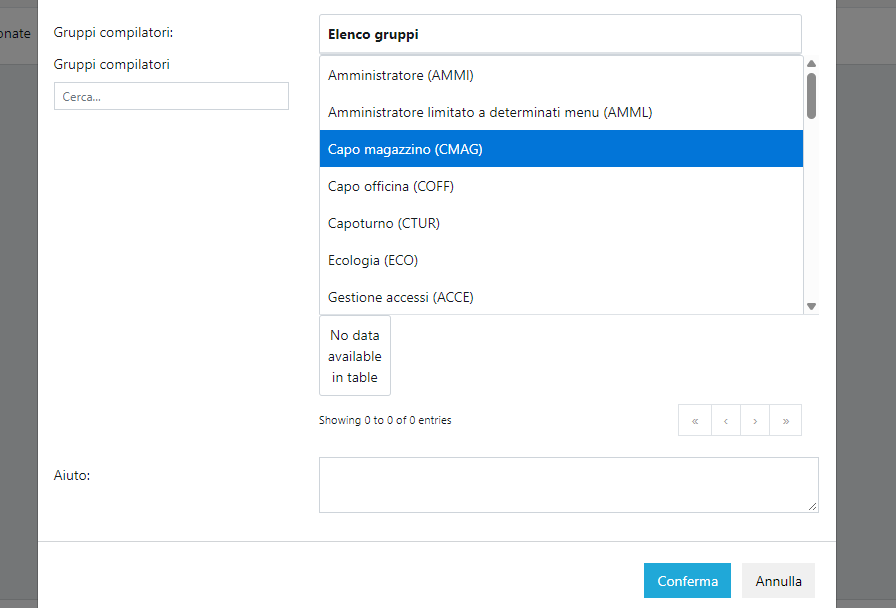
Answers
Looks like you defined an Editor field with the
datatablefield type like this example. The info is showing the Datatable doesn't have any records. At a minimum please post your Editor config so we can understand exactly what you have and how you are trying to populate the Datatable.Kevin
This message simply appears when updating DataTables and the editor from version 2.x to 3.x
It's difficult to help debug without any information about your config. Please at a minimum please post your Editor config. Better is a link to a test case showing the issue so we can help debug.
Kevin
It almost (but not quite) looks like it is initialising twice.
As Kevin indicates, are you able to send me a link to a test case so I can debug it?
Allan
I've not been able to reproduce this yet unfortunately. This example uses
scrollYfor the table and doesn't show the same problem. I've also tried using your exact configuration object from above (although I changed the language.url to load from the CDN), but it works okay:Are you able to give me a link to the page you are working on?
Allan
I know, I can’t figure it out.
It happens with DataTables 3.1.5, but if I go back to DataTables 2.3.7, everything works perfectly...
If you can't give me a link to the page, can you show me the full JS?
Allan