
ColumnControl: Search icon not activated with Server Side processing
ColumnControl: Search icon not activated with Server Side processing
 Wernfried
Posts: 35Questions: 10Answers: 0
Wernfried
Posts: 35Questions: 10Answers: 0
I use a datatable with ColumnControl and serverSide: true.
Problem is, the search icon does not change when search ist used. Also the ccSearchClear button remains disabled.
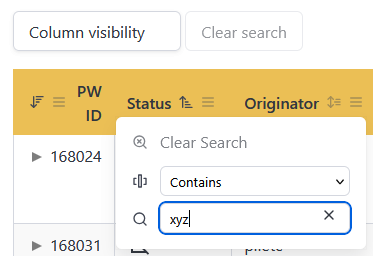
Does anybody know a solution?
When I set serverSide: false, then it is working fine but that's not an option for me.
Here is my config:
$("#dataTable").DataTable({
  columns: [
     { name: 'owner', data: 'owner', title: 'Originator', columnControl: ["order", ['searchClear', { extend: 'search' }]] }
  ],
  columnControl: ["order", ['searchClear', "search"]],
  order: [
     { name: 'sort', dir: 'asc' },
     { name: 'status', dir: 'asc' },
     { name: 'id', dir: 'desc' }
  ],
  layout: {
     topStart: { buttons: [ { extend: "colvis" }, "ccSearchClear" ] },
     topEnd: "search",
     bottomStart: { buttons: ["copy", "excel", "pdf", 'csv', "print"] },
     bottomEnd: null
  },
  ajax: {
     url: ...
  },
  serverSide: true,
  fixedHeader: true,
  deferRender: true,
  responsive: true
})

<link rel="stylesheet" href="/bulma/bulma.min.css"/>
<link rel="stylesheet" href="/stylesheets/datatables.min.css"/>
<script type="text/javascript" src="/jquery/jquery.min.js"></script>
<script type="text/javascript" src="/javascripts/bulma.js"> </script>
<script type="text/javascript" src="/luxon/luxon.min.js"></script>
<script type="text/javascript" src="/javascripts/lib/datatables.min.js"></script>
<script type="text/javascript" src="/pdfmake/pdfmake.min.js"></script>
<script type="text/javascript" src="/pdfmake/vfs_fonts.js"></script>
<script type="module" src="/javascripts/index.js"></script>
I think, it should be easy to reproduce the issue, otherwise let me to to provide more information.
I tested it on Firefox and Edge, Windows 11 and I am using the Bulma styling.
The greatest solution would be to have dedicated icons for active and inactive search, similar to the order icons. As far as I see from code, it always use the DataTable.ColumnControl.icons.menu icon and actually it is hardly possible to visually distinct whether the search is active or not.

Kind Regards
This question has an accepted answers - jump to answer
Answers
Have a look at this thread. There is an error in the current release that means
dtcc-button_activeisn't correctly applied when server-side processing is enabled. The nightly build has the fix and I'll look at tagging the release soon.Allan
I tried the nightly build. It fixes the inactive icon, however the "Clear search" button still remains disabled.
Until you will provide a fix for it, I will use this workaround:
Having the "Clear search" button always enabled is still better...
Wernfried
Thank you. I'll get that sorted out in time for the release.
Allan
Once you touch the code, I would propose also the change below. For some columns operators like "Empty", "Not empty" or "Does not equal" do not make any sense and you may want to suppress them. Seems to require only minor changes in the code:
And you may add the list of available operators:
Best Regards
Wernfried
That's a commit made to address the issue with
-content searchClearnot enabling when server-side processing is being used.I see you've got a PR for the ability to change the list of operators. I'll reply to that there - thanks for the PR!
Allan
Since it's somewhat related, I guess I can mention this here: It would be nice to be able to hide the "Contains/Starts With/etc" menu (just defaulting to contains, I guess). I haven't found an option to do this and had to use some CSS (took a while but eventually it worked). I'm working server-side and don't want to implement all that stuff since it's overkill and not useful in my use-case.
Yup, I can see that might be useful. Thanks for the suggestion. For anyone else interested in this, in the meantime, this is the CSS to use:
Allan