
Filter on date range with ColumnControl and server-side processing
Filter on date range with ColumnControl and server-side processing
 Wernfried
Posts: 31Questions: 8Answers: 0
Wernfried
Posts: 31Questions: 8Answers: 0
I like to filter on a date range with ColumnControl, I created two searchDateTime
$("#dataTable").DataTable({
   columns: [
      { name: 'id', data: 'id', title: 'ID' },
      {
         name: 'ts', data: 'ts', title: 'Start Time',
         columnControl: [
            "order",
            [
               { extend: "searchDateTime", format: 'YYYY-MM-DD', excludeLogic: ['notEmpty', 'empty', 'notEqual', 'less'] },
               { extend: "searchDateTime", format: 'YYYY-MM-DD', excludeLogic: ['notEmpty', 'empty', 'notEqual', 'equal', 'greater'] }
            ]
         ],
         render: DataTable.render.datetime('DD T', 'de-CH')
      }
   ],
   serverSide: true,
   ajax: {
      url: ...
   }

});
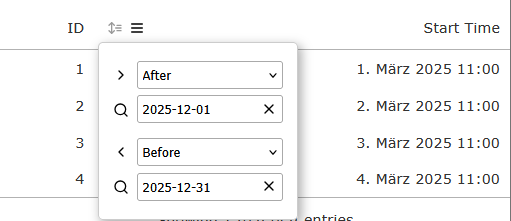
Problem is, only one value (the last one) is sent to the server.
columns: [
  {
    data: "ts",
    name: "ts",
    searchable: true,
    orderable: true,
    search: {
      value: "",
      regex: false,
      fixed: [],
    },
    columnControl: {
      search: {
        value: "2025-12-31",
        logic: "less",
        type: "date",
        mask: "",
      }
    }
  }
}
I am using server-side processing, so it would be no problem to modify the data with ajax.data. However, for this I need to know which values are selected in searchDateTime but I have no idea how to get these values. I did not find anything in the API and I did not find any event I could listen to.
Is there any method to retrieve the selected values from ColumnControl search field?
Life example: https://live.datatables.net/magacesu/2/edit
Wernfried
This question has an accepted answers - jump to answer
Answers
Unfortunately, what you are trying to do is not currently possible with ColumnControl. Each search input type can only be used once per column. Sorry.
Three only hack to make this work as the library stands, would be too force the drop-down to show when the Ajax request is made, then get the values from the Dom and then close the drop-down again.
Allan
Never mind. I think I will combine it with
searchListwhere I define some predefined ranges like "This week", "Next month", etc.