
Pdf 'download:' option | How to suppress downloading/opening
Pdf 'download:' option | How to suppress downloading/opening
 drupalista_com_br
Posts: 10Questions: 1Answers: 0
drupalista_com_br
Posts: 10Questions: 1Answers: 0
{
    extend: 'pdf',
    download: 'open', // My question is on this configuration option
    customize: function(doc) {
        pdfMake.createPdf(doc).getBlob(function(blob) {
            var formData = new FormData();
            // My fetch logic here for sending the pdf
            // somewhere else.
        });
    },
},
I'd like to suppress the downloading/opening of the pdf file.
I couldn't find a list of options for download:. I've tried 'none' but it does not prevent the downloading process.
I need help figuring out how to manipulate the download process in order to suppress it.
This question has an accepted answers - jump to answer
Answers
There is not a
downloadoption for the export buttons. The options are documented here. There isn't a built-in option to perform other actions instead of downloading.I'm not sure what you want to do instead of downloading but I think you will need to use
buttons.buttons.actionfor this. See if this thread points you in the right direction.If you still need help then please provide details of what you want the PDF export button to do.
Kevin
Yes, there is a
download:option. See here.I have tested it, without
download: 'open'it prompts to the download window. Settingdownload: 'open'opens the pdf in a new browser tab.I'm not sure what you want to do instead of downloadingI dont want it to perform no action at all. I just wanna grab a hold to thevar formData, which is the pdf content, at thecustomize:option.This kinda works:
What works
1.
var formDatacontains the pdf data I want;2. It suppresses the button action (no downloading window prompt and no opening in a new tab).
What does NOT work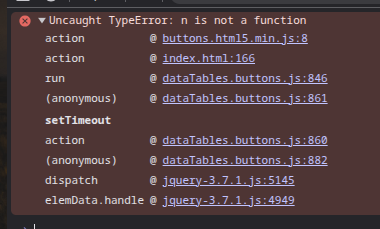
1. It throws an exception
2. The button circular animation does not quit. It hangs rotating.
What am I missing?
Buttons currently only has options to download or open the file (and even that is actually a bit limited by the browser's settings - i.e. it might download and open it).
If you just want the contents of the pdf in a buffer, you'd need to [modify the
html5pdfbutton at this point here. Once the PDF has been created, you'll be able to use their API to get the buffer.Allan
Sorry, yes you are right. The docs are here.
AFAIK there is not a way to stop the Datatables PDF export button from downloading the file. I modified the example in the thread I linked to. It generates the PDF doc into a variable but the PDF button just spins meaning something isn't working correctly with using
buttons.buttons.action. I might be missing something. @allan can let us know if usingbuttons.buttons.actionwill stop the download from occurring.Maybe we can offer other suggestions if tell us what you want to do with the generated PDF file. What are your requirements?
Kevin
`Maybe we can offer other suggestions if tell us what you want to do with the generated PDF file. What are your requirements?
Kevin`
My logic sends the pdf content to my server. My server uploads it to google drive.
The code I posted just above seems to prevent downloading/new tab opening in my brave browser. The issue is just the spinning button.
Regarding the exception thrown, see image I posted above. The exception is thrown even If I do nothing, like:
I've figured it out. The code below works, no exception thrown, no downloading prompt and no opening in a new tab.
The issue is the
cbarg that was missing.Thank you fellas.
I just remembered seeing that error before. The
buttons.buttons.actionhas new parameter that was added to buttons 3. It is a required parameter. I added a call to the callback in this updated test case and it solves the error:https://live.datatables.net/bowuguwe/1/edit
Also this doesn't seem to perform the download.
The parameter needs to be added to the function and call parameters, for example:
https://live.datatables.net/hobepiye/1/edit
Kevin
@kthorngren Yeap!!! that is it. The missing
cbwas causing the exception and the spinning button to never quit spinning. Problem solved. Thank you very much. I owe you a cold beer.I think we cross posted as I was editing the above post. Make sure to look at this test case:
https://live.datatables.net/bowuguwe/1/edit
It might do what you want to stop the download.
Kevin
@kthorngren
https://live.datatables.net/bowuguwe/1/edit
What method do I call on
pdfDocin order to get the pdf blob? You know, the actual pdf content?@kthorngren
Sorry mate. Forget about my last question. The answer is
pdfDoc.getBlob(), I gotta stop and get a coffee.Yes, your suggestion also solves my problem. Thank you again.