
Problem with excel export (visibility columns) when scrollX enabled
Problem with excel export (visibility columns) when scrollX enabled
 itajackass
Posts: 173Questions: 52Answers: 3
itajackass
Posts: 173Questions: 52Answers: 3
Hi i've a problem export excel with this scenario:
- responsive disable, scrollx enabled, fixed columns start and end
- small screen to simulate/enable the scrollx
- some visibility columns disabled by the user
test link: https://live.datatables.net/jofuzaro/1/
try to use a small screen to obtain fixed columns and scrollx like this and hide column, for example, SALARY
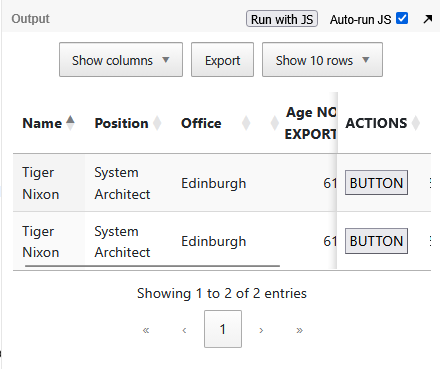
then try to export in excel and open the excel: it is corrupted
another try: comment scrollX: true and try again: now export work as expected, but now i've to scroll right to see the last column (cause is not fixed anymore)
another try: uncomment //scrollX: true and hide SALARY column by visibility
edit code to:
var table = $(node).closest('table').DataTable();
return table.column(idx).visible() &&  !$(node).is('.noVis, .azioni, .colControl');
now export is not broken, but all columns are exported (also SALARY)
Any suggest to fix this issue? thanks
This question has accepted answers - jump to:
Answers
The generated Excel file opens in both Office online and Libreoffice locally without any problems. Unfortunately I don't have local Excel. Is it local Excel you are using?
Allan
Hi, yes I use local Office. I tried to install Libreoffice, it opens the file without error message...but... the file is simply empty!
It is not a problem with the reader. I create a video to show you how to replicate problem with wetransfer: https://we.tl/t-g2rdcU0xMD
What is your goal with this code?
Debugging the code the value of
tableIDis always undefined. The reason is Datatables creates a duplicate table with the header to facilitate scrolling. Using$(node).closest('table')is getting the duplicatedtableelement as thenodeparameter is from the duplicated header.EDIT: In this case
$(node).closest('table').attr('id')will always returnundefinedresulting in an empty SS.Instead use
table().node()to get the originaltableelement. For example:var tableID = $( table.table().node() ).attr('id');
Updated test case:
https://live.datatables.net/weqefohu/1/edit
Possibly you can simplify this by using
column-selectoras a string with the :not() selector. For example:See this test case:
https://live.datatables.net/xayowaso/1/edit
Kevin
thanks for your reply.
my goal is to export only columns without those classes and export all columns NOT manually hidden using colvis.
I can confirm that your test case here: https://live.datatables.net/weqefohu/1/edit is perfect working.
The other code (btw is the code i was using time ago...):
is not good for me. why? because it export all columns (except for noVis/colActions/colControl) and bypass colvis plugin (if I want to manually hide some columns, the export ignore my custom selection and export all hided columns).
EDIT: is there a way to create a "reusable" code? because i need to include it in a lot of pages and if I use:
I must remember in each page to edit "table" with the name of variable, for example:
var tableID = $( orders_table.table().node() ).attr('id');
...
var tableID = $( invoices_table.table().node() ).attr('id');
....etc...
is there some way to retrieve the original table using one of these parameters of the function? idx, data, node ?
See this example for the selector to use to export visible columns, ie,
:visible. Add that selector to the:not()selector, like this:Updated test case:
https://live.datatables.net/xayowaso/2/edit
I don't know of a reliable way for this specific instance. Do you still need this with the above?
Kevin
OMG!
I was looking for a complicated solution only because i was using a bad code.
Before implementing this code i was simply using:
but it doesn't work if I enable responsive, because during export it exclude also columns hidden by responsiveness (and i want to exclude only columns selected by the user by colvis)!! See here:
Your code seems to be similar but it works!!!! thanks: