
dt-button-collection is outside the table
dt-button-collection is outside the table
 nguyenvandung.tmdt
Posts: 1Questions: 1Answers: 0
nguyenvandung.tmdt
Posts: 1Questions: 1Answers: 0
Link to test case:
Debugger code (debug.datatables.net):
Error messages shown:
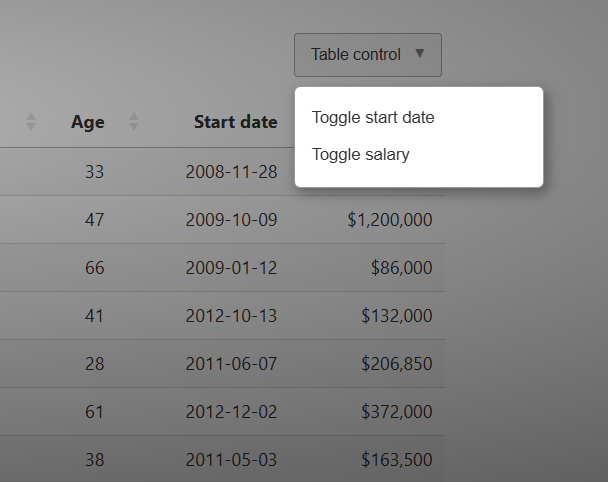
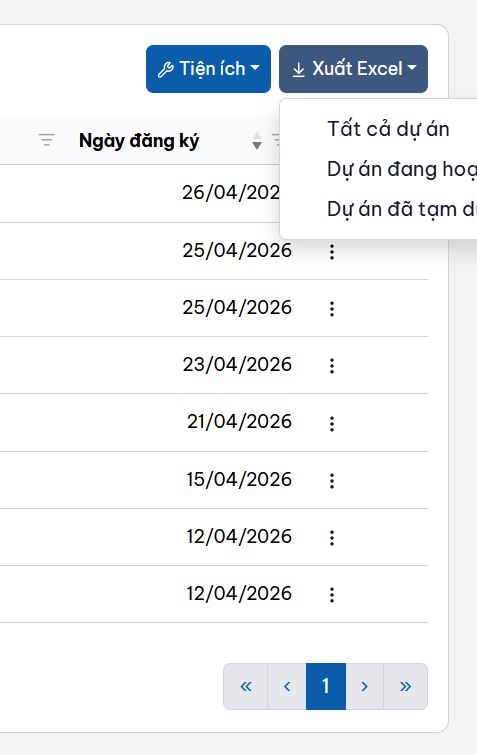
Description of problem: When using the collection button in the far right position (dt-layout-end or custom DOM), dt-button-collection is outside the table and its content may be partially obscured. How can this be fixed?
Answers
Can you link to a test case showing the issue please? When that happens there is code in the software to move the dropdown back into full visibility. If that isn't working for some reason, I'd need to be able to debug why.
I've just put this little example together to show it working:
Allan
I tried this earlier with a container that is smaller than the page width and replicated the issue. Updated test case:
https://live.datatables.net/lizekaxa/2/edit
Kevin
Perhaps I'm not doing the right thing to make it happen. I can see it overflow if I resize the window while the popover is shown, but I can't click on the button and have it show off the side. Is there a particular size or set of actions for that?
Allan
I think going to the full page shows the issue:
https://live.datatables.net/lizekaxa/2
Or I might not be understanding the issue
Kevin
Oh - actually, I think it might be me that's gotten mixed up. The "correction" to the position is based on the window, not the container. I'd assumed the second picture in the original post was the edge of the window.
Yes, I can see that it might be preferable to keep it in the container. I will take a look
Thanks for the correction!
Allan