ScrollX feature causing header and body columns to be misaligned
ScrollX feature causing header and body columns to be misaligned
 kjg520
Posts: 6Questions: 1Answers: 0
kjg520
Posts: 6Questions: 1Answers: 0
Test Case: https://nbalegacyscore.com/scorebyage.php
The widths of the columns for the header and body rows do not match when using the scrollX feature on the table on the above page. I have read through many of the support threads with related issues but have yet to find a solution. Another strange thing is that when I was running this on my local server the columns looked fine, but since moving it to the web the column widths do not match. Please take a look at the webpage and my code . Any suggestions are greatly appreciated.
Thank you!
My js code looks like this:
$(document).ready(function(){
$('#spinner-wrapper').hide();
$('#tblLegacyScoreByAge').show();
var table = new DataTable('#tblLegacyScoreByAge', {
fixedColumns: {
start: 2
},
scrollX: true,
scrollY: false
});
table.order([51, 'asc']).draw();
table.columns.adjust().draw();
});
Answers
Better example of the code. I don't know why it got so wonky.
$(document).ready(function(){
$('#spinner-wrapper').hide();
$('#tblLegacyScoreByAge').show();
var table = new DataTable('#tblLegacyScoreByAge', {
fixedColumns: {
start: 2
},
scrollX: true,
scrollY: false
});
table.order([51, 'asc']).draw();
table.columns.adjust().draw();
});
Looks like you are loading version 4.4.1 of bootstrap.css but version 5.3.3 of bootstrap.js. Probably should make these consistent. More importantly it doesn't look like you are loading the Datatables Bootstrap style integration files. Open either the datatables.css or datatables.js file to see the link to upgrade the Datatables libraries:
https://datatables.net/download/#dt/dt-2.2.2/fc-5.0.4/fh-4.0.1
Choose the version of Bootstrap you decide upon in step 1 to get the proper styling files. This will likely fix the alignment issues.
Kevin
Thank you for your quick reply.
I have implemented the suggestions you have made regarding standardizing Bootstrap code references and including it in my datatables implementation as well. This appears to have helped somewhat but the problem remains.
Interestingly, the table columns are not misaligned on my local server but they are on the web server.
Local:
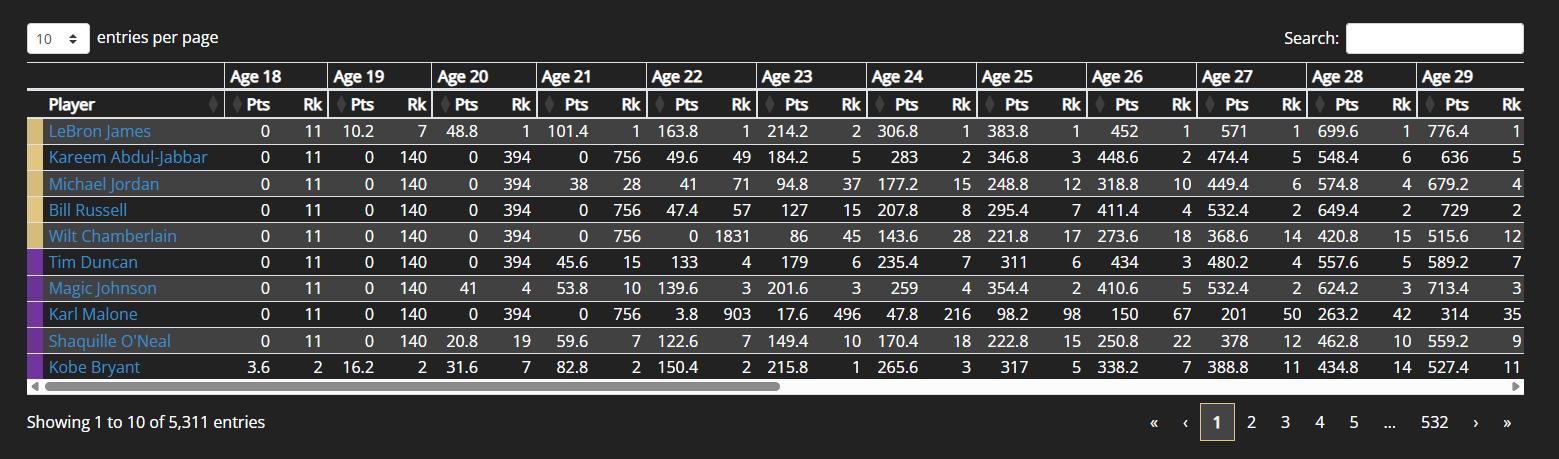
Web:
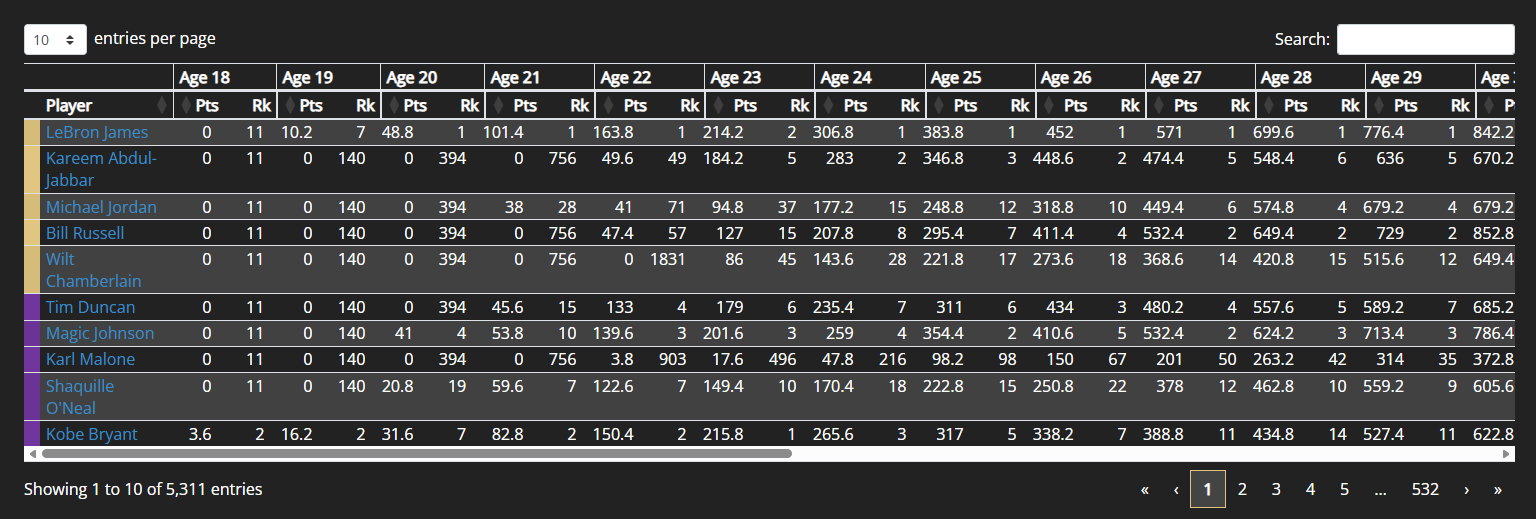
I have diffed the html for both pages and the only differences appear to be link references. I assume there is potentially something in my web server config that is getting in the way, but I don't know what to look for exactly, so I would appreciate any suggestions there.
Thanks again!
Looks like you chose BS 4 but did not perform the second step I mentioned above:
In the those files you will find this link to the Download Builder with those options selected:
https://datatables.net/download/#dt/dt-2.2.2/fc-5.0.4/fh-4.0.1
In Step 1 choose BS 4. This will provide the styling files to work properly with BS 4. This should resolve the column alignment issue. See the Style docs for more details.
Kevin
Thanks again. I did that at first and assumed it was wrong because there was no reference of bootstrap anywhere in the css so I selected bs4 in step 2.
That said, I now believe I have the correct supporting files, which you can confirm, but the problem remains.
https://nbalegacyscore.com/lib/DataTables/datatables.js
https://nbalegacyscore.com/lib/DataTables/datatables.css
I am not sure what my next steps are.
I wonder if you need to clear your browser's cache. I had to clear mty browser's cache to load the updated datatables libraries. Here is a screenshot of what I see now:
Inspecting the page before clearing the cache showed the previous datatables libraries were still being loaded.
Kevin
Yeah, its still broken in your screenshot.
It starts out ok but each data column starts a little bit earlier than the last one. Look under Age 23. The values start before the heading column starts.
Its more apparent if you scroll all the way to the right. There are headers that are missing completely.
It turns out the solution for me is to not use ScrollX at all.
This Stack Overflow thread proved helpful.
https://stackoverflow.com/questions/46467033/datatables-net-scrollx-header-and-data-column-width-issues
This has solved my issue.
Wow, I was looking at the issue and suddenly all the columns lined up
I was looking at this CSS. It appeared that removing it fixes the issue but not sure now.
It is found in
styles.css:108. You can try reenabling the scrolling features to test it. You should be able to usescrollXand fixedcolumns. There seems to be a CSS conflict that is causing the issue. If removing the above doesn't help then, as a test, don't load styles.css to see if the conflict is there.@allan is much better at debugging styling issues than I am. If you add the scrolling features back then he can take a look and like find the culprit.
Kevin