Fixed Header is not aligning correctly vertically on scroll in small screens
Fixed Header is not aligning correctly vertically on scroll in small screens
 imc123
Posts: 1Questions: 1Answers: 0
imc123
Posts: 1Questions: 1Answers: 0
Description of problem: Fixed Header is not aligning correctly vertically on scroll in small screens
Answers
This example seems to work correctly on an iPhone. Make sure you have all the correct JS and CSS files for the style framework being used. Use the Download Builder for this.
If you still need help please provide a link to a test case replicating the issue so it can be debugged.
https://datatables.net/manual/tech-notes/10#How-to-provide-a-test-case
Kevin
Hi Kevin,
I have something that seems the same issue.
This is my web page https://sailwave.com/results/huw/Sailwave-DataTables-ExperimentV08.htm.
I look forward to any pointers for resolving the issue.
PS - you kindly helped point me in the right direction with other issues on the aforementioned page, which were much appreciated.
Kind regards,
Huw
@Huw_Pearce
I copied the relevant parts of your code into this test case so I could experiment.
https://live.datatables.net/rukorose/1/edit
It looks like you have defined
colgroupfor each table. Datatables also definescolgroupto help handle column widths correctly. I don't know all the details of how this works.In the test case I removed the
colgroupfrom the first two tables. Scroll through the first two tables and you will see when the fixHeader is applied the header width stays the correct width. However when the FixedHeader is applied to the third table the column width is incorrect. Inspecting the header you will see twocolspanelements; The first is created by Datatables and the second is yours with thestyleattribute added. For example:It seems these are conflicting. I'm not sure if you are using
colgroupfor anything in your solution. If not removing them might resolve the issue. @allan will need to look to debug further.Kevin
Hi Kevin,
Thank you for your prompt answer and pointer to where there is conflict in my code.
I will go and look at my code with your insight.
Thank you very much.
Kind regards,
Huw
@Huw_Pearce I forgot to mention a couple other issues I found. First is you have the same
idfor each table:id="summarytable. Theidattribute is expected to be unique on the page. One option is to add a digit to eachidto make them unique, for example:id="summarytable1.Second is this statement on line 42 is missing a close quote after
.css:That CSS is not being loaded. It should look like this:
Kevin
Hi Kevin,
Apologies for not responding sooner.
Thank you for the feedback, much it is much appreciated.
Question - if each table has a unique id, how does DataTables work on tables that I want sorting and responsive actions to work on? Do I have to create the code for each unique table id?
Kind regards,
Huw
Datatables creates an API instance for each table. They operate independently. You can use the
tables()API to select the appropriate table if you need to use the API.Kevin
Hi Kevin,
still working incorrectly.
I don't appear to have a problem with it here:
What browser and OS are you using? And what is the width of the view port for the "Output" in your screenshot?
Is it Kevin's test case you are using for that screenshot, or something else? The headers appear different?
Allan
Use my test case:
https://live.datatables.net/rukorose/1/edit
I removed the added
colgroupfrom the first and second table but left it on the third. Thought that resolved the issue but when scrolling past the header of the second table it becomes unaligned:Scroll past that to the third table with defined
colgroupand its worse.This is on a Mac with Chrome Version 134.0.6998.89 (Official Build) (arm64). I think you need to have a small container to see the issue.
Kevin
I see it now - many thanks for the clarification Kevin. It looks like the last table is struggling as well. I'll take a dig into it.
Allan
@allan, this still working incorrectly, Please resolve this issue
It is still in my to do list - I've just been working on other things. I'll look at it as soon as I can and post back here when I've got an update. If you need it to be prioritised, there are support packages available.
Allan
Hola, quería saber si esto ya está solucionado. Actualmente estoy trabajando en un proyecto y las columnas no coinciden con los encabezados de la tabla. Tengo habilitadas las extensiones FixedHeader y Responsive, y estoy utilizando las últimas versiones de DataTables y sus extensiones.
@AntonioAR - Could you post a link to your page showing the issue, so I can debug that directly please?
Allan
Hola, gracias por responder.
No puedo mostrar el proyecto ya que es interno de la empresa y, por motivos de privacidad, no me es posible compartirlo.
El problema que tengo es exactamente el mismo que el del usuario imc123, tal como se muestra en la siguiente imagen: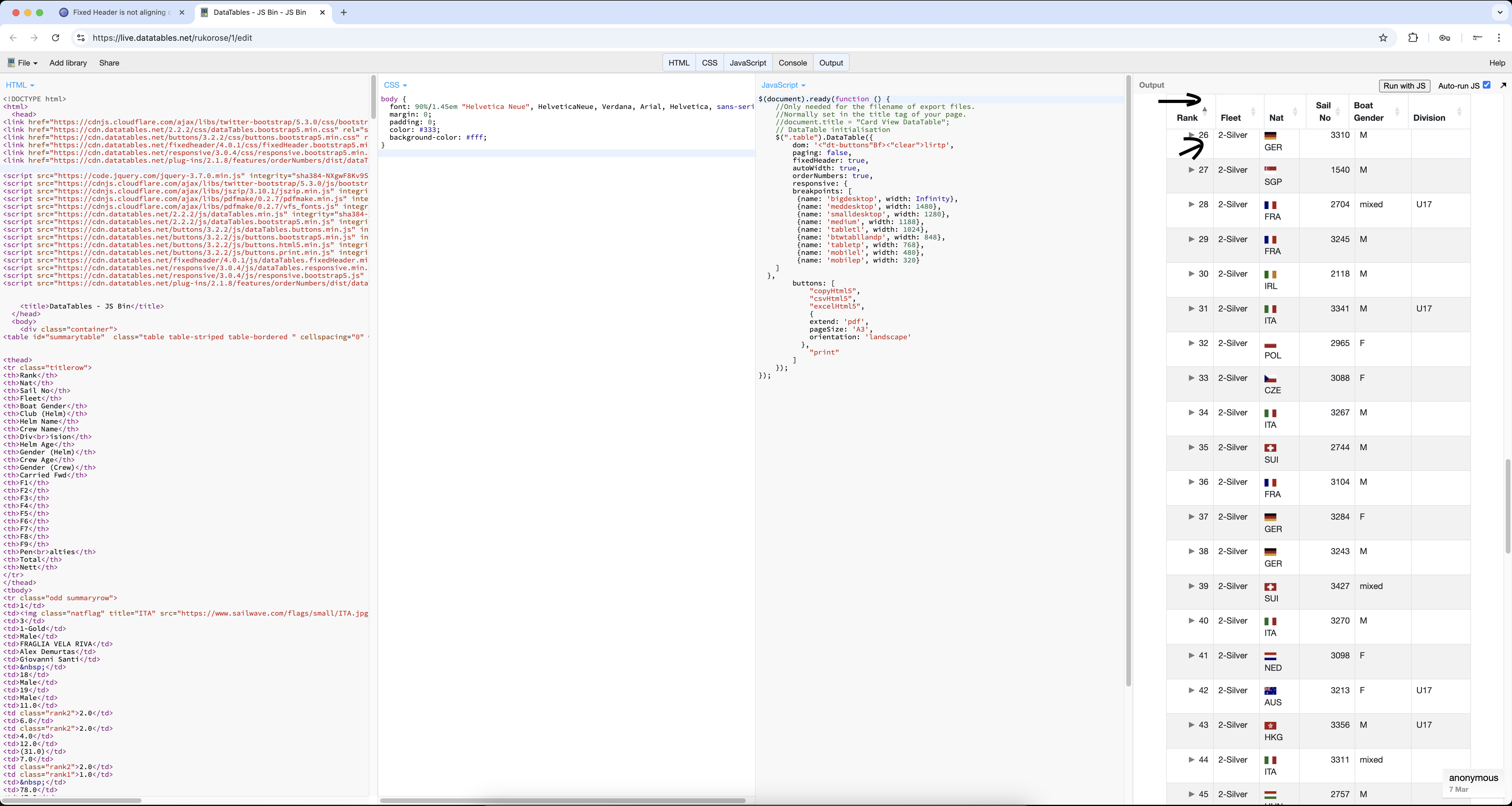
Cuando se carga la página, la tabla se muestra correctamente. Sin embargo, al hacer scroll y activarse FixedHeader, las columnas del encabezado cambian de anchura y no coinciden con las columnas del cuerpo de la tabla. Esto provoca una desalineación entre el <thead> y el <tbody>, generando problemas visuales y de usabilidad.
Apologies - I haven't had a chance to look into it this week. I hope to do so on Monday.
Allan
@allan gracias
I've managed to identify the problem. The issue was that FixedHeader wasn't taking into account the columns hidden by Responsive. What it was doing was making a call to DataTables'
.columns(':visible')to get the visible columns. But that allow for Responsive hidden columns. My feeling is that it should, so I've made a modification to both Responsive and DataTables core to allow for this.The nightly builds of each have this fix now, and with them, the example works correctly.
If someone else could try it and confirm the fix works, that would be appreciated. Assuming all is good, I'll drop a release for both of them.
Allan
Hola @allan, sigue funcionando con problemas. Te adjunto el enlace del nuevo test que he hecho; he modificado algunas cosas, pero el problema persiste.
Para reproducirlo, tienes que entrar en este test, cambiar la longitud de página de 10 a 100 y luego hacer scroll hacia abajo. Verás que sigue desalineado, igual que antes.
Imagen: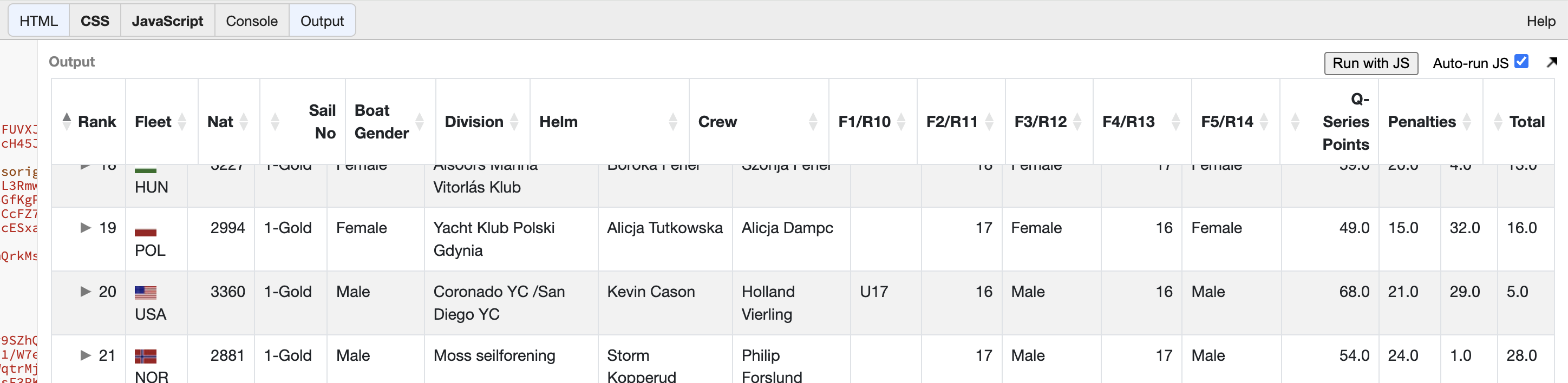
enlace : https://live.datatables.net/lubobiri/1/edit
The issue there is that the cached positions of the tables on the page are not refreshed when the table is redraw. I've committed a change to address this and the nightly for FixedHeader now has this fix. The example is now working well.
Allan
Hola @allan, el problema sigue sin resolverse. Al añadir más columnas a las tablas, se puede observar que el desalineamiento persiste, incluso en el ejemplo de referencia que compartiste.
The problem I'm seeing actually, is that Responsive isn't working so well when resizing the view output.
Can you give me step by step instructions on how to see the misalignment with the latest example? It seems to work for me in that regard.
Allan
Hola, aquí te dejo el enlace del test para reproducir el fallo.
Al igual que antes, basta con cambiar la longitud de la tabla de 10 a 100 y hacer scroll hacia abajo.
También se puede observar el problema al cambiar el tamaño de la ventana.
https://live.datatables.net/yequgata/1/edit
Hola @allan,
Haciendo algunas pruebas, me he dado cuenta de que en la tabla tengo autoWidth: false desactivado. Sin embargo, al ordenar columnas que contienen strings largos, las columnas no respetan esa configuración y ajustan automáticamente su ancho, a pesar de que ya tengo el width definido en la cabecera de la tabla.
https://live.datatables.net/dadubizo/1/edit
If you look in your bowser's inspector tools, you'll see that your column widths are applied to the columns and there is no override from DataTables. The columns are being collapsed because that is how HTML tables work with things don't add up. Your table is
width: 100%, but the column widths add up to a lot more than 100px! Therefore, the browser will reduce the column widths to fit in as much as possible into the container. You can see that even without DataTables in your example.If you need the columns to match the widths you have given, you need to use
table-layout: fixedinstead: https://live.datatables.net/dadubizo/3/edit .Column widths are very difficult to specify in tables that are too wide for the container - even in this example where you'll see in your Inspector that all columns are given 100px width, the browser overrules!
In this case, I would be tempted to do:
https://live.datatables.net/dadubizo/5/edit .
I haven't been able to get column misalignment in either Firefox or Chrome for this one.
Allan