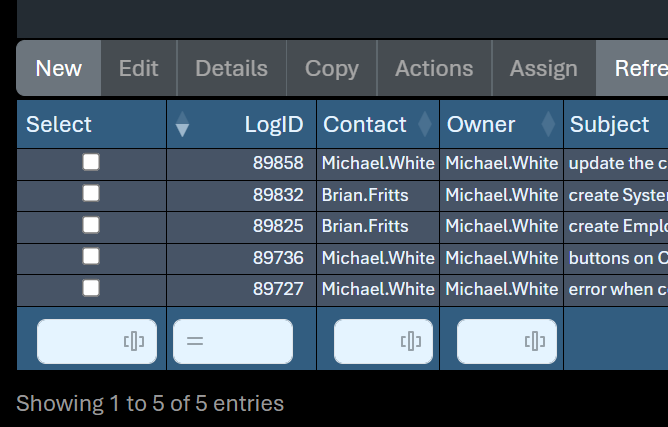
How to exclude first column (select checkbox) from columnControl where target is tfoot?

How to exclude first column (select checkbox) from columnControl where target is tfoot?

Mwhite007Mwhite007 Posts: 15Questions: 5Answers: 0

Link to test case:
Debugger code (debug.datatables.net):
Error messages shown:
Description of problem:

This question has an accepted answers - jump to answer

Answers

  • allanallan Posts: 65,649Questions: 1Answers: 10,918 Site admin

    How to exclude first column (select checkbox) from columnControl where target is tfoot?

    Just as shown in this example. Have the content for the target column as an empty array.

    If that doesn't help, please show your current configuration.

    Allan

  • Mwhite007Mwhite007 Posts: 15Questions: 5Answers: 0

    i tried that... the javascript
    columnControl block looks like this:

        columnControl: {
          target: 'tfoot',
          //target: 'tfoot:not(:first-child)',
          //columns: ':gt(0)',
          content: ['search']
        },
    

    and the columnDef looks like this:

        columnDefs:[
          {
            orderable: false,
            searchable: false,
            render: DataTable.render.select(),
            targets: 0
          },
          {
            target:0,
            columnControl: []
          },
    ]
    
  • Mwhite007Mwhite007 Posts: 15Questions: 5Answers: 0

    also, i am using jQuery 4.0.0, Bootstrap 5.3x, DataTables 2.3.7

  • Mwhite007Mwhite007 Posts: 15Questions: 5Answers: 0

    if you care about the html tfoot code:

            <tfoot>
              <tr class="subHeading">
                <th class="narrow">&nbsp;</th>
                <th class="narrow">&nbsp;</th>
                <th>&nbsp;</th>
                <th>&nbsp;</th>
                <th>&nbsp;</th>
                <th>&nbsp;</th><!--- 5 --->
                <th>&nbsp;</th>
                <th>&nbsp;</th>
                <th>&nbsp;</th>
                <th>&nbsp;</th>
                <th>&nbsp;</th><!--- 10 --->
                <th>&nbsp;</th>
                <th>&nbsp;</th>
                <th>&nbsp;</th>
                <th>&nbsp;</th>
                <th>&nbsp;</th><!--- 15 --->
                <th>&nbsp;</th>
                <th>&nbsp;</th>
                <th>&nbsp;</th>
                <th>&nbsp;</th>
                <th>&nbsp;</th><!--- 20 --->
                <th>&nbsp;</th>
                <th>&nbsp;</th>
                <th>&nbsp;</th>
                <th>&nbsp;</th>
                <th>&nbsp;</th><!--- 25 --->
                <th>&nbsp;</th>
                <th>&nbsp;</th>
                <th>&nbsp;</th>
                <th>&nbsp;</th>
                <th>&nbsp;</th><!--- 30 --->
                <th>&nbsp;</th>
             </tr>
            </tfoot>
    
  • Mwhite007Mwhite007 Posts: 15Questions: 5Answers: 0

    I also tried combining the columnDef section like this:

        columnDefs:[
          {
            columnControl: [],
            orderable: false,
            searchable: false,
            render: DataTable.render.select(),
            target: 0
          },
    
  • kthorngrenkthorngren Posts: 22,437Questions: 26Answers: 5,161

    The columnDefs.target only seems to work when columnControl.target is not used, for example:
    https://live.datatables.net/keforuwi/1/edit

    However specifying either thead like this:
    https://live.datatables.net/futukabo/1/edit

    or tfoot like this:
    https://live.datatables.net/geludixo/1/edit

    columnDefs.target doesn't not work.

    @allan will need to take a look.

    Kevin

  • kthorngrenkthorngren Posts: 22,437Questions: 26Answers: 5,161
    edited March 30

    Unless Allan has a quick fix, as a workaround, you could use ready() end remove the ColumnControl span created in the first column, something like this:

    $('#example tfoot th:first-child span.dtcc').remove();
    

    For example:
    https://live.datatables.net/mafohava/1/edit

    Kevin

  • allanallan Posts: 65,649Questions: 1Answers: 10,918 Site admin
    Answer ✓

    Ah! If you don't specify a columnControl.target then it will assume the default. The key here is that:

    columnControl: []
    

    is actually just a shorthand for:

    columnControl: {
      target: 0,
      content: []
    }
    

    So if you are telling the top level columnControl to position in a target other than the default, then you also need to tell the column specific configuration the same:

    new DataTable('#example', {
      columnControl: [
        {
          target: 'tfoot',
          content: ['search']
        }
      ],
      columnDefs: [{
        target: 0,
        columnControl: [
        {
          target: 'tfoot',
          content: []
        }
      ]
      }]
    });
    

    While this might seems like an extra complication for the configuration this is method to the madness :). Doing it this way means that you can have the header and the footer (and any rows inside them) defined with their own configuration.

    Regards,
    Allan

  • kthorngrenkthorngren Posts: 22,437Questions: 26Answers: 5,161

    @allan I may have missed it but didn't see anything in the docs or examples that explained this. Can this be added to the documentation and/or examples?

    Kevin

  • allanallan Posts: 65,649Questions: 1Answers: 10,918 Site admin

    Good point! I've made it explicit in the docs. It is on the dt3 branch, but I hope to merge that to master in the not too distant future.

    Allan

Sign In or Register to comment.