
override select highlight color
override select highlight color


currently i'm using jQuery 4.0.0, Bootstrap 5.3.x, dataTables 2.3.7 (with select and keytable extensions). i am getting a bright blue highlight on selected rows which doesn't match my color scheme. i'm using variables for the color scheme to i can re-skin easily but i can't seem to find the correct css selector. i've tried box-shadow and outline-color and every level of css using inspect but can't seem to change that blue. i have the same issue with the keytable cell with focus.
the table tag looks like this:
<table id="dt_system" class="table table-hover headingTable" width="100%">
the css color variables look like this:
/* Define Global Variables to be used throughout the sheet */
:root {
  --FontFamily: Aptos, "Trebuchet MS", Tahoma, Calibri, Roboto, Helvetica;
  --SmallFontFamily: "Aptos Narrow", Tahoma, Calibri, "Roboto Condensed", Helvetica;
  --LineHeightCompact: 1.1;
  --MenuBG: #525357;  /* Typically same as ParamBG */
  --MenuFontColor: #E5E2DA; /* Typically same as ParamFontColor */
  --MenuFontSize: 8pt; /* Typically same as SubDataFontSize */
  --SubMenu1BG: #3A3A3D; /* Typically 10% darker/lighter ParamBG */
  --SubMenu1FontColor: #E5E2DA; /* Typically same as ParamFontColor */
  --SubMenu2BG: #222224; /* Typically 20% darker/lighter ParamBG */
  --SubMenu2FontColor: #E5E2DA; /* Typically same as ParamFontColor */
  --ParamBG: #525357;
  --ParamFontColor: #E5E2DA;
  --ParamInputBG: #DEE1D6; /* Typically same as ParamFontColor */
  --ParamInputFontColor: #171A18; /* Typically same as ParamBG */
  --ParamFontSize: 12pt;
  --HeadBG: #394E60;
  --HeadFontColor: #E5E2DA;
  --HeadFontSize: 18pt;
  --SubHeadBG: #635554;
  --SubHeadFontColor: #E0E5CF;
  --SubHeadInputBG: #F0F8FF; /* Typically same as SubHeadFontColor */
  --SubHeadInputFontColor: #191970; /* Typically same as SubHeadBG */
  --SubHeadFontSize: 12pt;
  --DataBG: #848973;
  --DataBGHover: #ACB396; /* to highlight selected row */
  --DataFontColor: #171A18;
  --DataFontSize: 10pt;
  --DataLinkHover: #C7CCB8; /* Typically same as SubDataBG */
  --SubDataBG: #C7CCB8;
  --SubDataFontColor: #171A18;
  --SubDataFontSize: 8pt;
  --subDataLinkHover: #635554; /* Typically same as SubNeadBG */
  --DataSelectedOutline: #C7CCB8; /* Typically same as SubDataBG */
  --dt-row-selected: #C7CCB8; /* Typically same as SubDataBG */
}
the current css attempt looks like this but i tried so many combinations without success
/* Selected Row Background */
table.dataTable tbody > tr.selected td {
  box-shadow: var(--DataSelectedOutline) !important;
  background-color: var(--DataBG) !important;
  color: var(--DataFontColor) !important;
}

/* Selected Cell Background, outline, fontColor */
table.table tr.data td.focus {
  box-shadow: var(--DataSelectedOutline) !important;
  outline-color: var(--DataSelectedOutline) !important;
  background-color: var(--DataBG) !important;
  color: var(--DataFontColor) !important;
}
the javascript has this for the keys and select options
keys: {
      editor: systemEditor,
      blurable: true,
      columns: '.editable'
},

select: {
     selector: 'td:first-child',
     blurable: true,
     style:    'os',
     headerCheckbox: false
},
This question has an accepted answers - jump to answer
Answers
here is what the inspection shows for that selected row/cell
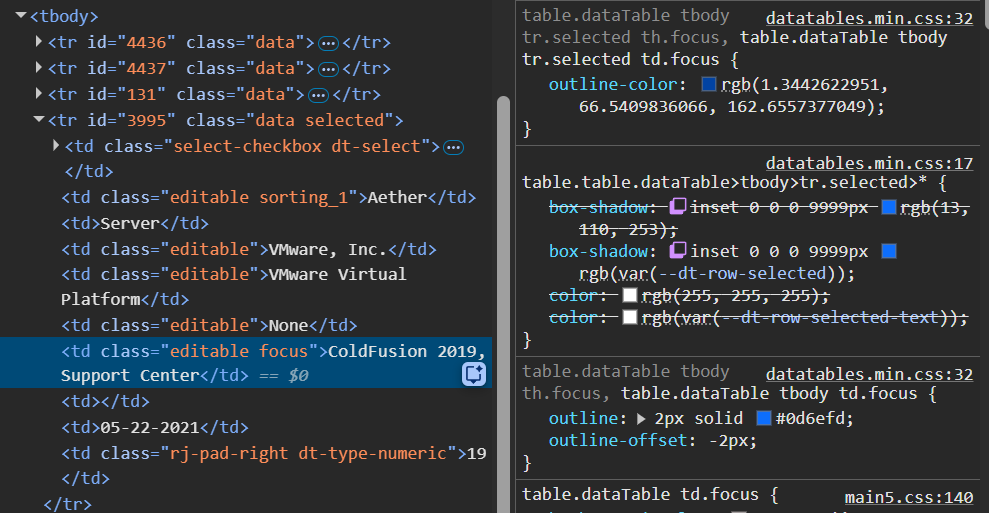
Debugging styling issues from code snippets and screenshots is very difficult. I built a simple test case with your code snippets using BS 5 and it seems to work:
https://live.datatables.net/fuliqudi/206/edit
Please update the test case or provide a link to a page replicating the issue so we can help debug.
https://datatables.net/manual/tech-notes/10#How-to-provide-a-test-case
Kevin
I made an updated version. it still doesn't show the problem but it brings it closer to my environment so i can continue to troubleshoot
https://live.datatables.net/zezuyela/1/edit?html,js,output
In the updated test case you added these statements:
and
One issue is these are for the default Datatables styling not for Bootstrap 5 style integration. The test case I created used the Download Builder to a concatenated library including the BS 5 style integration files for Datatables, select and keytable, for example:
Updated test case without the duplicate default styling files.
https://live.datatables.net/zezuyela/2/edit
Possibly the problem is due to not loading the correct style integration. Plus your test case is now loading duplicate .css and .js which can lead to operational issues. Please confirm that you are loading the proper Bootstrap 5 integraion files and loading them only once.
In the test case I'm seeing this:
If I uncheck the
background-colorstyle for the selectortable.dataTable tbody > tr.selected tdthen the.data tdbackground-coloris used. I don't see the selectortable.dataTable tbody > tr.selected tdin your above screenshot. Have you verified this CSS is being loaded on your page?Possibly there is a CSS precedence issue.
Kevin
Looks like you might be loading the custom CSS in
main5.css. Try clearing the browser's cache to load the current version of the file.Kevin
i notice that when i go to the Editor section of the site, all the samples exhibit the same blue bar highlight when a row is selected so maybe the issue is with editor css
This BS5 with Select example shows a blue bar for the selected row. This is the default and expected behavior. Same with this Editor BS5 exampe. You can try loading your site without loading the Editor library to confirm if it's causing a conflict. You may need to comment out options, like buttons and keytable, in the Datatables init code that use the Editor instance variable.
Kevin
without editor it works fine...
https://live.datatables.net/zezuyela/1/edit?html,js,output
I'm having trouble setting up a test case with editor. lost my select checkbox
https://live.datatables.net/zezuyela/3/edit
I may have misunderstood your previous comment but if you think the Editor is causing an issue with the styling on your page then try removing it from your page as a test to see what happens. The test case isn't running due to this console error:
The test case is not loading this library.
Did you see my above comments about the .js and .css you added to the test case?
I updated your test case to use the Download Builder to to load Datetime and Columncontrol using the concatenated files:
https://live.datatables.net/zezuyela/5/edit
Did you try looking at my suggestions for your troubleshooting?
Kevin
I have updated my test cases based on your suggestions. the test cases are a mish-mash of cut and paste, in production code i am just including separate files which i store locally... i'm just trying to get something that looks like production, i am using ajax against a MS SQL server to get and edit my table data and i have a bunch of custom buttons and other functions so i didn't want to paste the whole thing... but maybe i'll update the test case again
current version...
https://live.datatables.net/zezuyela/6/edit
still doesn't show the blue bar on selected row so it's still a struggle to show you the problem other than all the standard datatable/editor examples such as https://editor.datatables.net/examples/inline-editing/simple.html
Since this is a styling issue I don't think Editor is needed although we can add a few lines of code to make it work locally without ajax. I don't believe it is involved with styling the selected row. Your specific data nor ajax loaded data will affect the styling.
My suggestions are more about looking at what is happening on your page not the test case. To summarize:
1- Make sure to load the Datatables and the extensions using the Bootstrap 5 styling (see this doc and make sure to load them only once.
2- Verify that this CSS is being loaded on the page:
Doesn't look like it is overriding the Select CSS based on your screenshots. Maybe clear the browser's cache to make sure the current CSS files are being loaded.
3- Verify your page's CSS precedence.
Kevin
i think it's finally working, i transferred the 2 variables:
and the 2 css blocks over to a new color scheme and it worked: