
Displaying active SearchPane filters with saved state
Displaying active SearchPane filters with saved state
 ajdurant
Posts: 5Questions: 1Answers: 0
ajdurant
Posts: 5Questions: 1Answers: 0
Link to test case: https://live.datatables.net/bijepoqa/2/edit
Description of problem:
I'm using the filterChanged function to update a div to show the currently selected filters from searchPanes. This is similar to the question https://datatables.net/forums/discussion/comment/186843 and in the linked example I have it working and updating as the filter items are selected:
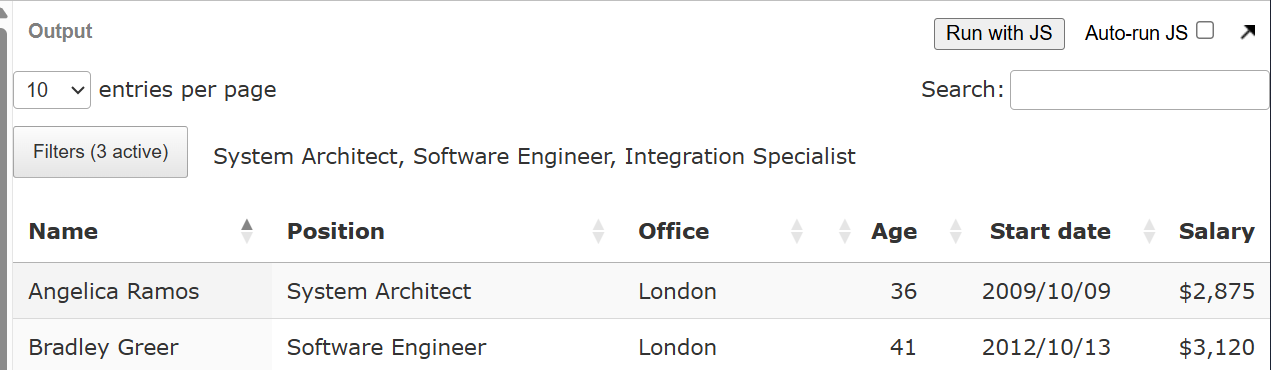
However, I'm also using saveState, so that when the page is reloaded the filters are active, but the list is not populated:
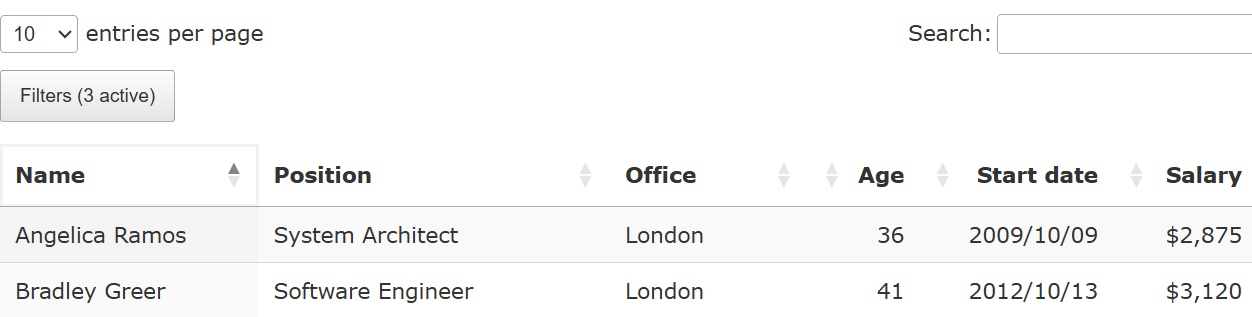
In my filterChanged function I'm getting the selected rows from the table API:
var items = $('.dtsp-searchPane table').DataTable().rows({
    selected: true
}).data().map( (item) => item.display);
document.getElementById('filterItems').innerHTML = count > 0 ? items.join(', ') : '';
But because I'm using a button with searchPanes, the table doesn't exist on page load, only after it's been clicked.
It looks like I should be able to get the selections from the main datatable state: $('#example').DataTable().state().searchPanes.selectionList which in the example contains the same values as the display, but in my actual code these are just ids and not the display values.
Is there a better way to do this? Is there some way to initialise the table in the background without clicking the button? Do I need to use the values from the state selectionList, and somehow look up the display values - if so how do I find the data?
Answers
The
searchPanesbutton has adelayInitoption which istrueby default and means that the SearchPanes instance won't be initialised until the button is pressed. You can set it tofalseto have it load up immediately: https://live.datatables.net/bijepoqa/5/editThat said, it looks like you'll still need to do:
The
filterChangeddoesn't look great at all - triggering when it doesn't need to: https://live.datatables.net/bijepoqa/6/edit .SearchPanes is over due for a rewrite - there are too many quirks like this. Hopefully this will get you going tho...
Allan
One option is to use
button().trigger()to open the SP window then immediately close it by using JS or jQuery to click the background. Updated test case:https://live.datatables.net/bijepoqa/4/edit
I'm not sure why you are getting the ID instead of the display value. Likely due to your data structure and how you are handling the data.
@allan may have better ideas and may be able to help with why you are getting the ID with
searchPanes.selectionList.EDIT: See he has a better answer
Kevin
Thanks for the quick response.
Setting this to false doesn't seem to make a difference. As you note, the table still isn't in the dom, so my existing method doesn't work. And looking at
.state().searchPanesthe data seems to be there in either case.Using
.state().searchPanesdoes seem to be the way forward. I just need to work out how to map the data to the display value.For my actual project all the data comes from the server side, and is provided a list of
{value: <int>, label: <str>}items for the searchPane.When first loaded
.state().searchPaneshas bothpanesandselectionListwhere panes contains all the data I could use to look up, but after changing the selections, onlyselectionListis in there and I don't know where to look up the data other than my original$('.dtsp-searchPane table').DataTable().rows({selected: true})I did notice this and thought it was a bit strange, but doesn't particularly affect me other than unnecessary processing, so I wasn't too worried.
And playing about a bit more with reading the state in
filterChangedit doesn't seem to update until after that has run. So the state read is old, even when the count has updated:I guess I can read the state on first load, then use the other method for future updates. I've also seen it not always updating as the filters change (including the count staying the same number).
delayInitseems to only be used here:if (dt.init().stateSave || config.delayInit === false) _buttonSourced(dt, node, config);and I'm usingstateSaveso that will be why it has no effect.Okay, I think I've now got this working, but it's pretty hacky. I can't easily show it in live.datatables.net as the SearchPane data is not using the
value/labelitems.I'd prefer not to do the DOM query, but I can't find a way to get the pane data after the panes have been loaded into the DOM. Other than diving into
this.context[0]._searchPanes.s.paneswhich seems like getting too much into the internals.