How to have sorting and filtering together in table head?
How to have sorting and filtering together in table head?
 HugoHa
Posts: 6Questions: 2Answers: 0
HugoHa
Posts: 6Questions: 2Answers: 0
Hello,
https://datatables.net/examples/api/multi_filter_select.html shows how to implement filtering of columns using select inputs (dropdowns). How can this functionality be placed not in the footer, but in the head of the table in an additional line (= table row) below the table head that contains the column names and the sort controls?
Thank you for a helpful hint!
HugoHa
Link to test case: https://datatables.net/examples/api/multi_filter_select.html
Debugger code (debug.datatables.net):
Error messages shown:
Description of problem:
This question has accepted answers - jump to:
Answers
See this example:
https://live.datatables.net/saqozowe/2131/edit
It uses the second header for the search inputs and
orderCellsTopto set the column sorting events in the top header. You can find other threads with more examples.A better optino might be to use the ColumnControl extension.
Kevin
Thank you Kevin, this works as expected! And I will take a look at the ColumnControl extension, that looks really mighty!
The only detail left is that I have some columns without select inputs (dropdowns):
this.api().columns([2, 3, 4, 5]).every( function () {The other columns (0 + 1) show the sort arrows which is not desired - how can I get rid of them? Another thing that is not completely as desired is the fact that the cells with the select inputs (dropdowns), eg in the second TR, are sensitive to clicking too and initiate sorting:
How can this be achieved? Thank you for another helpful advice!
columns.orderablecan be used to disable ordering for specific columns (and thus will remove the ordering icons). You can useordering.handlerto disable the default click to order as well (although that is global, not column specific).As Kevin says - use ColumnControl. You can readily have a search input and a sort click icon, or any combination of them. Check out this example for instance.
Allan
Another option is to use
orderCellsTopas I mentioned above. Updated test case:https://live.datatables.net/saqozowe/2640/edit
Kevin
Ah yes , sorry. If it's just that you don't want the icons and handler on the second row if the header, use
orderCellsToportitleRow.Allan
Thank you for your help - I'm really excited about how powerful this tool is and how helpful the community is!
One more thing... I implemented a fixed header for this table like described here: https://datatables.net/extensions/fixedheader/examples/options/header_footer
This gives the following error:
Uncaught TypeError: can't access property "sDefaultContent", col is undefined
Without the code for the filtering of columns using select inputs (dropdowns), everything works fine, so I suppose these 2 features are not compatible together, at least in the way I combined it:
What is missing here? Thank you again for a little hint!
Best, HugoHa
Datatables handles scrolling features like
scrollXand FixedHeader by creating a duplicate header. The duplicate header is displayed and the original header is hidden. Datatables duplicates the header to facilitate scrolling. You can inspect the HTML to see this. Your code is still accessing the original hidden header.Use
columns().header()instead. Pass in the parameter of1to loop through only the second row. Here is an example:https://live.datatables.net/ciqoguri/1/edit
Kevin
Thank you Kevin, works perfectly now!
Still amazed how much this community helps!
HugoHa
Yup, Kevin deserves a huge amount of kudos for the amount of help he's provided so many people over the years. Much respect .
.
Allan
Just lurking on this post, but I'll echo @allan in that @kthorngren's help has proven invaluable to me over the years!!
Agree with @Loren Maxwell . Thanks a lot for your help, Kevin!
I developed this with Kevin's help as well. Pretty similar to the above.
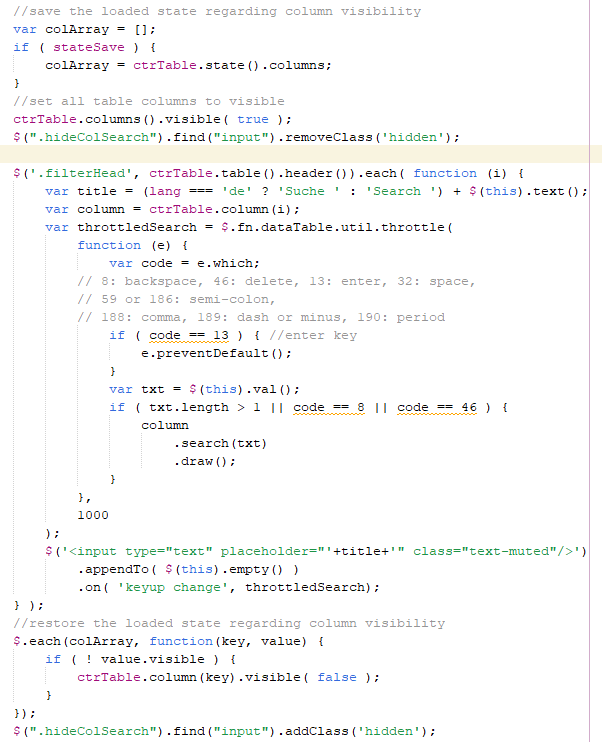
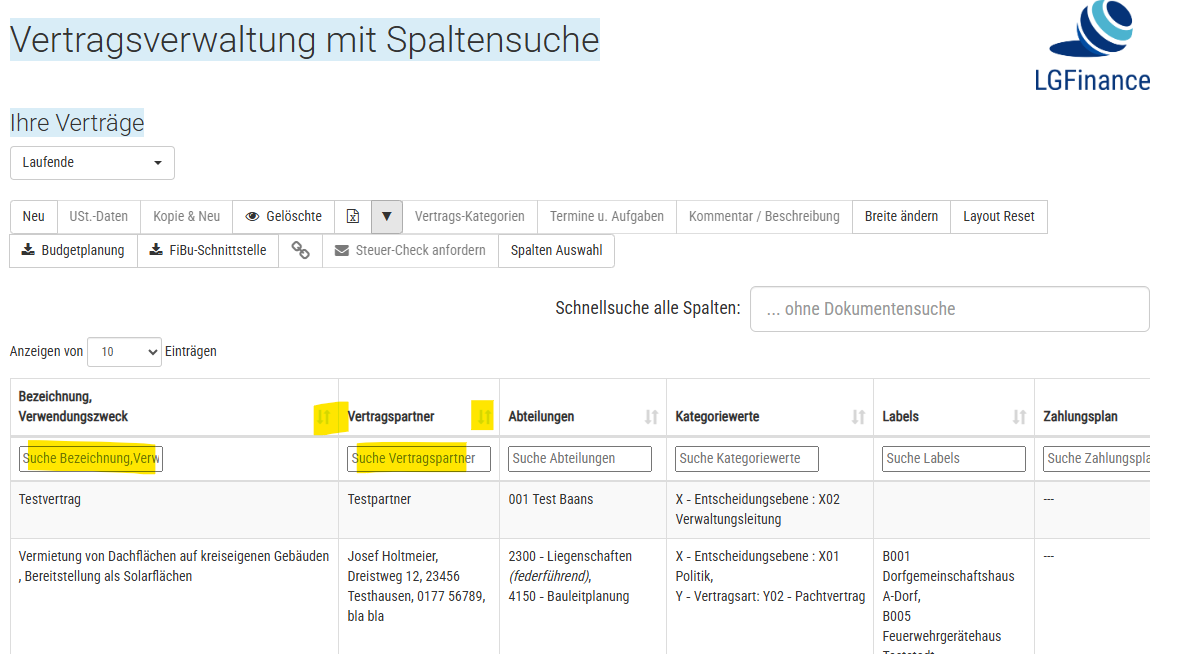
This is what it looks like. The search fields also have placeholders named after the field name plus the German word for "search". I also needed to make all columns visible temporarily to make it work - and then restore the loaded state right afterwards. Fairly complicated ... I probably would have never gotten this running without Kevin's input.
Screeenshot of some of the code: