
columnControl not populated in ajax.data and stateSaveParams
columnControl not populated in ajax.data and stateSaveParams
 Wernfried
Posts: 43Questions: 11Answers: 0
Wernfried
Posts: 43Questions: 11Answers: 0
When you use columnControl together with ajax.data, serverSide: true and/or stateSave: true, stateSaveParams then the columnControl search settings are not included in callback data parameter:
$("#example").DataTable({
  columns: [...],
  columnControl: [ "order", [ 'searchClear',  { 'search' } ] ],

  serverSide: true,
  ajax: {
     url: '/ajax/data',
     contentType: 'application/json',
     submitAs: 'json',
     data: function (data) {
        console.log(data.columnControl); // -> prints 'undefined'
     }
  },

  stateSave: true,
  stateSaveParams: (settings, data) => {
     console.log(data.columnControl); // -> prints 'undefined'
  })
})
The data is properly send for Ajax and state is properly saved, including all columnControl settings, that's working fine. However, if someone likes to manipulate data.columnControl then it is not possible, because they are not accessible.
For me this issue is not critical, because I don't need to manipulate data.columnControl, I only wanted to see it for debugging (where other possibilities are available).
Kind Regards
Wernfried
This question has accepted answers - jump to:
Answers
After some testing, I have to revert my statement "The data is properly send for Ajax and state is properly saved, including all columnControl settings, that's working fine."
Ajax works fine. However, the columnControl state is saved properly, but when you reload the page, i.e. when state is loaded then saved search values are used only for plain searches but
searchListare not used.Are you able to provide a link to a test case showing the issue please?
Thanks,
Allan
Let's split my post and focus to one issue each.
ajax.data not complete
When you use Server-Side processing and columnControl, then sent data is enriched with
columnControldata, see Server-side processingHere full config to demonstrate.
Open the page. No data is loaded/shown, but this does not matter. Set some filter, e.g.
console.log in
dataprintsbut console.log in
beforeSendprintsThe result should be the same.
The data which is sent to server is 100% correct, however ajax.data does not include the
columnControladdon. So, there is no easy way to manipulatecolumnControlrelated data before it is send to the server.Next issue:
stateSaveParams.data not complete
Open the table and do some filtering, like in previous example.
stateSaveParamsprintsbut in localStorage you have
The issue is similar to the previous one.
The data which is sent to localStorage is 100% correct, however stateSaveParams.data does not include the
columnControladdon. So, there is no easy way to manipulatecolumnControlrelated data before it is send to localStorage.Next issue:
searchList dropdowns are not restored from localStorage
Use the same setup as before, and do some
columnControlfilteringRefresh the page.
Filtering for
ageis restored from localStorage, howevernameis not:Please note, in the table the filter is applied properly (you see only one row for Bradley Greer). But the dropdown list in columnControl search is not updated. It may look like only a cosmetic issue. However, when you use server-side processing, then the server has no information about any
searchListfiltering which was restored from the localStorage.Interesting one. The issue is that
preXhr, which ColumnControl uses to add its data, is executed after theajax.datafunction. In this case that is certainly wrong, but I'm hesitant to immediately change the order in case there is something I'm not thinking of that would cause a problem. The documentation forpreXhrdoesn't say where in the sequence it will trigger, so it is something that could change. I've got a note to look into this more.What what it is worth though, if you want to submit a JSON string to the server, use
ajax.submitAs.The
stateSaveParamscallback is happening before thestateSaveParamsevent. If you dotable.on('stateStaveParams', ...)instead then it should work.I will have a think about how I can have the extension events happen before the developer's listeners. That is an important point there.
This is very much a bug. Thanks for letting me know about it. I've committed a fix and will be releasing ColumnControl 1.2 with the change (and your PR) shortly.
Allan
Thank you, I will test it after Christmas.
The 3rd issue was most relevant for me, thanks for the fix. Issue 1 and 2 are more cosmetic.
Wernfried
Regarding searchList dropdowns are not restored from localStorage
It looks better with ColumnControl 1.2 - as long as you don't use ColReorder extension with changed order of columns.
If you reorder your columns and reload the table, then search conditions are messed up. Please let me know, if you need sample config and data to reproduce the issue.
I'll need to recreate it locally. If it is as simple as ColReorder, ColumnControl
searchListand state saving, then I should be able to recreate it. I'll take a look, probably early in the new year.Allan
I found another issue with ColumnControl and stateSave
searchListI define items with
options, it looks like this:The state for the seems to be saved correctly. When you reload the page, then last filter is applied properly, but column in header the selected values are not marked.
I created example for testing and reproducing: https://live.datatables.net/rihobaga/1/edit
When you load the page, then search icon of Status is "active"
and this send to server (and the server filters the result accordingly).
so that's all fine.
But the value is not selected, the page should be open as this:
I created the same example but without server-side processing and no state save.
https://live.datatables.net/zamubene/1/edit
As you see, the filtering does not work either:
Table should show 2 rows. While this might be a valid bug, it does not apply to my application, because I use server-side processing.
Best Regards and happy new year
Wernfried
It's not working with the client-side example because the column's
renderfunction is always returning an HTML string for the icon. It should only do that for thedisplaydata type. For thefilterdata type you actually want it to returnvalue. You might want that for ordering as well.I've tweaked the client-side example to do that, which allows it to work as expected.
I believe that is the issue with the server-side processing example as well. Here is the updated test case and it is sending the correct data.
Allan
For client-side I expected such similar answer. I did not had a detailed look into render documentation.
But for server-side, your change does not help. It looks like this:
The search icon (the three lines) are marked as active, the table is filtered correctly but the drop-down does not tick the selected values.
Here a tweaked
ajaxfunction to make proper simulation of server:After some more tests I found out:
It works fine when ColumnControl gets the option list from server response (see https://datatables.net/extensions/columncontrol/server-side
columns[i][columnControl][list])But it fails when
optionslist is a static list defined on client-side like this:For me it's fine, I don't care whether I define the static list at client-side in option
columns.columnControl.optionsor if I put it at the server-side response.I created two examples to illustrate my previous post.
Working

https://live.datatables.net/jukozoxi/1/edit
Not working
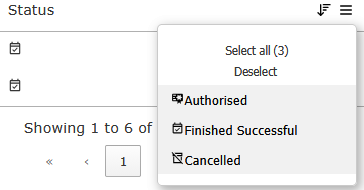
https://live.datatables.net/rihobaga/7/edit
But as said, for me this limitation is fine, there is no urgent demand from my side to get it fixed.
Kind Regards
Wernfried
One more note: Last Working/Not Working statement applies also ColReorder issue.
Short and final summary:
When you use server-side processing and
stateSaveandsearchListcolumnControl, then you should not use searchList.options - It breaks ColReorder and it fails to show selected values.searchListvalues should be provided by server returned data columnControl[columnDataSrc], (or maybe added atajax.dataSrc- I did not test) then everything is working fine.It's up to you, whether you are going to fix this issue or not. However, if you don't fix it, then it might be useful to add according note to the documentation.
Kind Regards
Wernfried
Hi Wernfried,
Many thanks for your investigation into this! This is the commit to fix the issue with locally defined options not being shown as selected when state saving is used.
Allan
I haven't yet got a fix for the ColReorder issue yet I' m afraid. I think that is something I'm going to have to make a change in ColReorder to address. Part of the problem is that which plugin runs first (i.e. the load order) means we can have different code paths.
Allan